50+ MCP tools, OAuth, and the official Runway Claude Connector
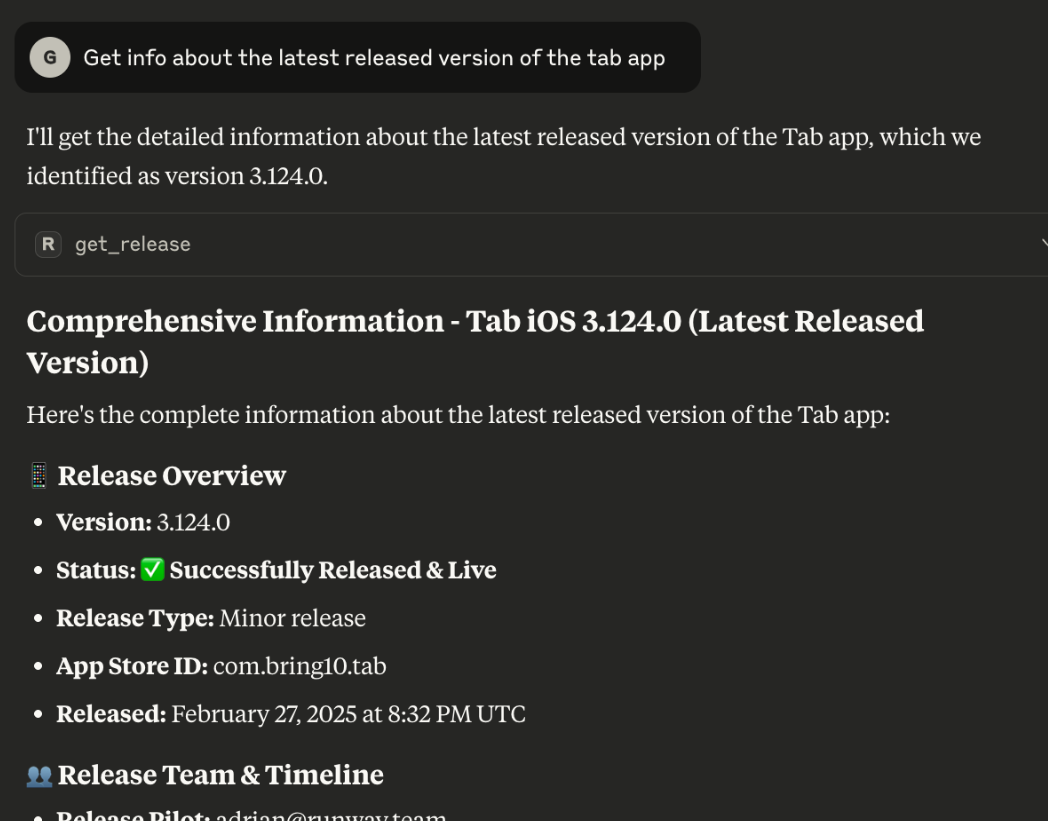
Since launching Runway's MCP server, we've continued to expand what you and your agent of choice can see and do — to the tune of 56 tools and counting. On the “read” side, new interactions that are now possible include asking for adoption rates by version, grabbing summaries of app store user reviews, checking statuses of regression testing runs and seeing how those might delay a scheduled release, quickly finding which release a given ticket or code change landed in, listing your configured integrations and their health, and much more. In the “write” direction, you can now do things like request, approve, and reject fixes, pause and resume automations, trigger CI workflows, and even spin up new hotfix releases. We’ve been carefully adding context and improving tool design to help you accomplish what you’re trying to do as quickly and naturally as possible, for example by making the MCP better at identifying releases from keywords like “next”, “current”, or “last” instead of exact version strings.
To make MCP setup easier we now support OAuth and, for those of you that use Claude, the official Runway connector is now live in their directory! Non-generative bonus: we’ve added functionality analogous to the new MCP tools to our public API where it makes sense, so you have multiple ways to integrate your stack with Runway.
Even more control and context for fix requests
We shipped a handful of updates that allow you to further customize and add rigor to Runway’s fix request flow. For teams with stricter sign-off requirements on late changes, you can now require multiple approvers per fix (e.g. calling for both a tech lead and a product owner to OK a fix before it's pulled into a release). The Feature Readiness step surfaces at-a-glance approval progress on each fix item and every individual approval is captured as a timeline event so you have a full audit trail. Plus, you can now build an entirely custom fix request form, with any number of distinct fields and optional validation on each field that can make them required, or even required with a minimum amount of text. You can also define placeholder text for each field and (separately) pre-populated text, if you like.
To further safeguard your release diffs and avoid delays, you can also now prevent new fix requests after the given release has been submitted to the store. When this feature kicks in, the fix request flow is blocked everywhere — in the Runway dashboard and via Slack actions, MCP, Release ATC chatbot, and the API — and to provide guidance to your team, you can append custom copy to the explanation shown when a request is blocked.
Track how your team’s AI usage breaks down and evolves
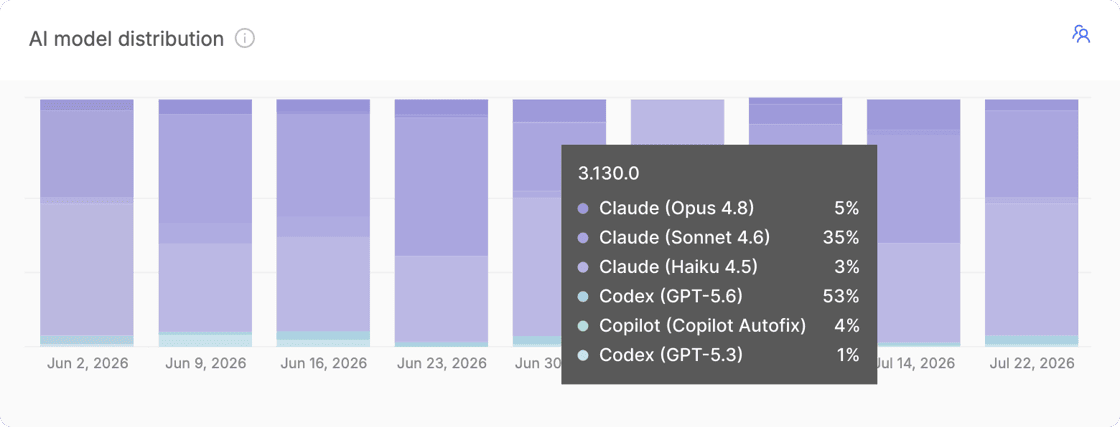
With more and more of the code teams ship being written by AI or with its assistance, we’ve heard that teams increasingly want visibility into exactly that — how much of what they're shipping has been touched by AI, and by which AI tools and models. Runway now surfaces this kind of data in a few places. On the Feature Readiness step, items are annotated with their AI authors or co-authors, and Runway drills down into pull requests to surface percentage of AI changes (by commit volume) as well as info on the specific models involved. Additionally, on both Org and Release overviews, there are new charts showing the percentage of AI-assisted changes and a breakdown of AI providers and models in use over time.
New Dependencies view for iOS
There's a new section in each release that captures the state of your iOS project's dependencies. Runway continuously scans your project’s dependencies per release and displays them in a table, surfacing which versions you're currently on and highlighting anything that’s out-of-date as well as OS requirements where applicable. For teams shipping multiple apps within one Flightpath, there's a separate tab per app so you can review dependencies for each.
Automatically create incidents and a new Incident management & scheduling integration: incident.io
In addition to leveraging an Incident management & scheduling integration to sync your on-call schedules with Runway release pilot rotations, you can now also have Runway take actions in the other direction. Based on various triggers of your choosing (e.g. if health metrics become unhealthy, an active rollout is halted, or your app is rejected during store review) Runway can automatically create an incident or alert in your incident management platform. And, incident.io joins PagerDuty, Rootly, and Jira Service Management as a supported Incident management & scheduling integration type.
More flexible logic to automatically halt unhealthy rollouts in multiple different scenarios
Runway's automation to halt an unhealthy rollout previously evaluated each configured health metric independently, so any single metric violating its threshold would trigger a halt. For more flexibility in defining auto-halt behavior, you can now create groups of metrics. Metrics within a given group are evaluated with ‘AND’ logic such that the group triggers only if all metrics violate their thresholds, and ‘OR’ logic is applied across the different groups such that they are each evaluated as independent alternatives. This lets you capture and act on more nuanced definitions of "unhealthy", for example halting only when a crash metric and a related performance metric degrade at the same time, and avoid halting rollouts on noisy, isolated signals. Groupings can be configured per release type, and any existing configuration automatically carries over as a single group.
Destination management and custom tags to make wrangling many apps even easier
For teams that ship many apps through Runway, we’ve added new functionality that streamlines how you can manage shared integrations and settings and interact with app-specific data. Related groups of apps can now be defined using “tags” (e.g. by geo, tier, internal/external audience, or whatever other dimension your team segments on), and you can use these tags to search, filter, and sort while viewing metrics, managing integration settings, or taking batch actions (coming soon). You can configure these tags and app membership via a new “destination management” section in Org settings, which surfaces all of your apps in one place and allows you to also edit app names and icons.
Public links for individual Build Distro builds
There are a number of situations where you need to get a build into the hands of someone outside your org: an external partner, a QA agency, or even just an internal stakeholder who isn't a Runway user. You already have the ability to create Build Distro buckets which allow public access, but that's overkill if you only want to share one specific build. Now, you can enable public access on individual builds. When enabled, Runway generates a unique link that will direct any viewer to the given build’s install page, and the Runway UI clearly indicates the build is publicly accessible so that’s clear to your team. Alongside these changes, there's a new Build Distro section in Org settings where you can set expiration policies for both public build and bucket links, so external access doesn't outlive its purpose.
More control over your release schedule settings
Depending on your team’s particular release cadence, you may need a certain target date top land on a subsequent week. For example, perhaps you kick off your releases on Mondays and submit on Thursdays — not the one that immediately follows, but rather Thursday of the following week. Although there were previously ways to accomplish this with the help of our team, you can now manage this for yourself in the platform, and Runway will render a helpful calendar preview of exactly how your configured schedule will play out.
And even more automation: mark releases live in monitoring tools and auto-pull submissions
A couple of other new automations will help your team maintain release hygiene and resolve blockers without extra work. First, on the iOS side, if plans change after you’ve already submitted a build for App Store review — say a late fix is added to the release, a fix request is approved, or you decide to skip that release cycle entirely — Runway can automatically developer reject the submitted build to clear the way for a new build, or for a following release. And, Runway can now mark releases as live in your stability monitoring and observability & analytics tools at the end of each release cycle. Depending on the specific integration and as needed, Runway will first create the new release in the integrated tool and may append additional context, e.g. a link to the release in Runway and the exact release timestamp.
Org overview revamp with custom dashboards and AI-powered insights
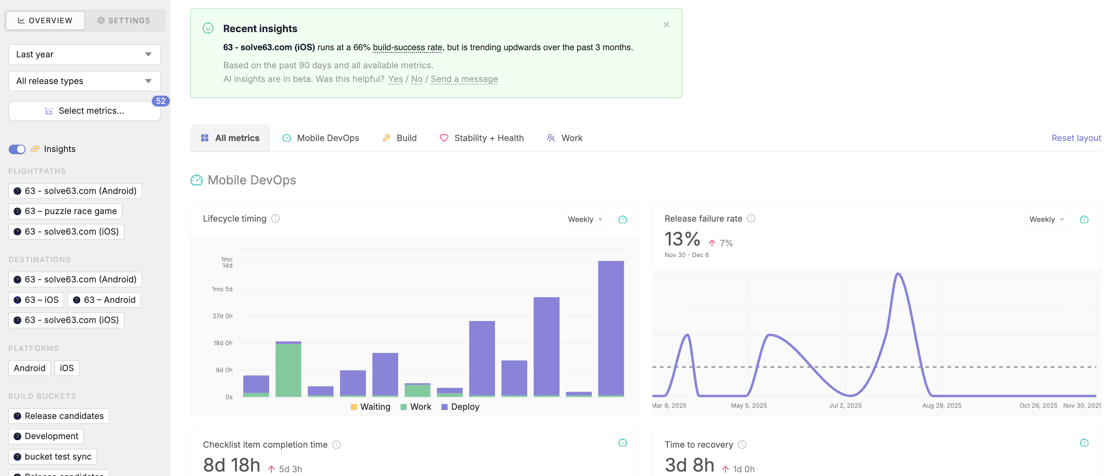
With everything that's changing in how engineering teams build, measuring performance and tracking trends is more important than ever — not just as they relate to your apps and their health, but also your team and how you all operate and collaborate. We reworked the organization-level overview in Runway to pull in even more data, give you more ways to drill in and view trends over time, and help you understand if what you're looking at is normal or needs attention.
You can now customize your Org overview dashboard, rearranging and resizing charts and selecting exactly which metrics you want to surface. Date filters are much more flexible now, you can adjust the aggregation of certain data, and there are new types of filters that allow you to drill down by apps, platforms, teams, and team members where applicable. The different charts available to you have expanded, with new options that include:
Checklist, approval and regression item completion rates (How often is your team actually actioning requisite tasks in your process? How often are test cases passing?)
Target date hit rates (Do you tend to kick off, submit, and release on time? Where do delays tend to crop up?)
Cherry-pick volume and acceptance rate for late fixes (How many changes does your team add post-cut? How often are late changes pushed back on?)
Any or all of the stability and health metrics you have configured for rollout monitoring (How are key health metrics tracking over multiple releases? What are the baselines that should inform where you set your alerting and automation thresholds in the rollout context?)
To help you actually make sense of all this data, we now surface benchmarks sourced from comparable teams and summarize key changes and trends in AI-powered insights at the top of the page, which link directly to the specific charts they concern.
Build size alerting
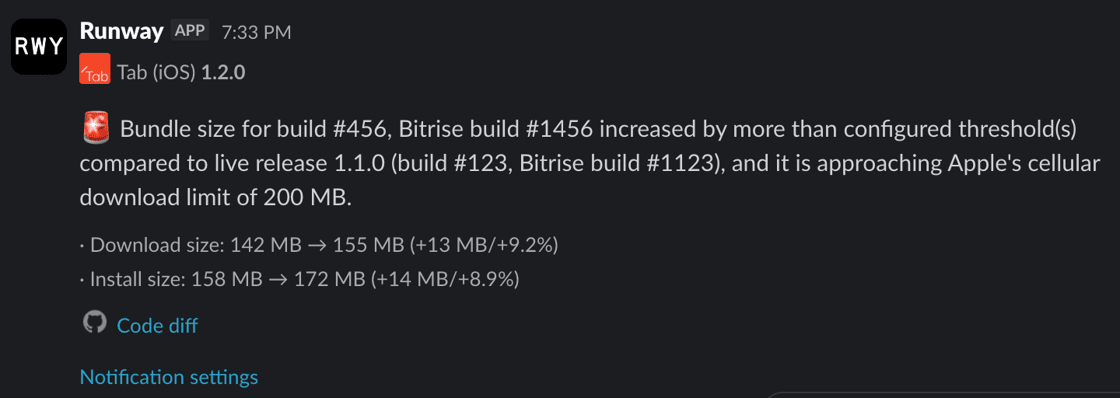
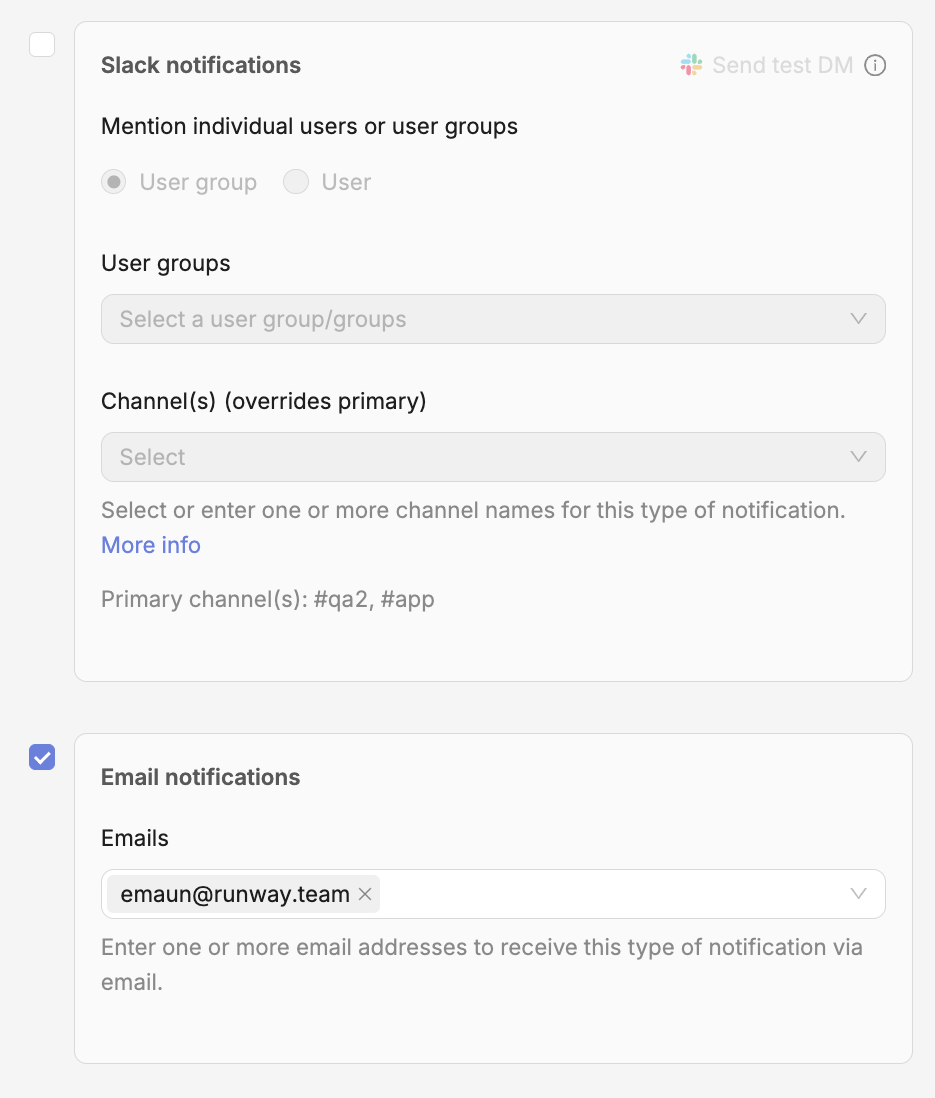
It can be hard to keep tabs on binary size release to release, and even small increases can affect download and install metrics. We’ve added a new type of notification that monitors build size and alerts you if build size increases beyond some allowable threshold compared to your previous release. You can configure the threshold as a percentage or absolute delta, as well as choose to be alerted for all builds that surpass the configured threshold or only the first build in a release that does so. You also have the choice of monitoring download size (Android and iOS), install size (iOS only) or both (iOS). On the iOS side, you can choose a specific device model to monitor if your team prefers that to Universal, and you can also configure an additional alert that fires if your bundle is approaching Apple’s 200 MB cellular download limit.
Support for Claude as AI provider and BYOK
Runway’s AI-related features (e.g. Release ATC, user reviews analysis and translation, release summaries, org overview insights) were previously built on top of and tightly coupled with the OpenAI API. We abstracted that dependency away and now also offer Claude as an alternative provider. Your team can configure your choice of provider in org-level settings, and you can now also drop your own API key in there if you prefer to BYO.
Chat with Runway Release ATC anywhere, not just in DM
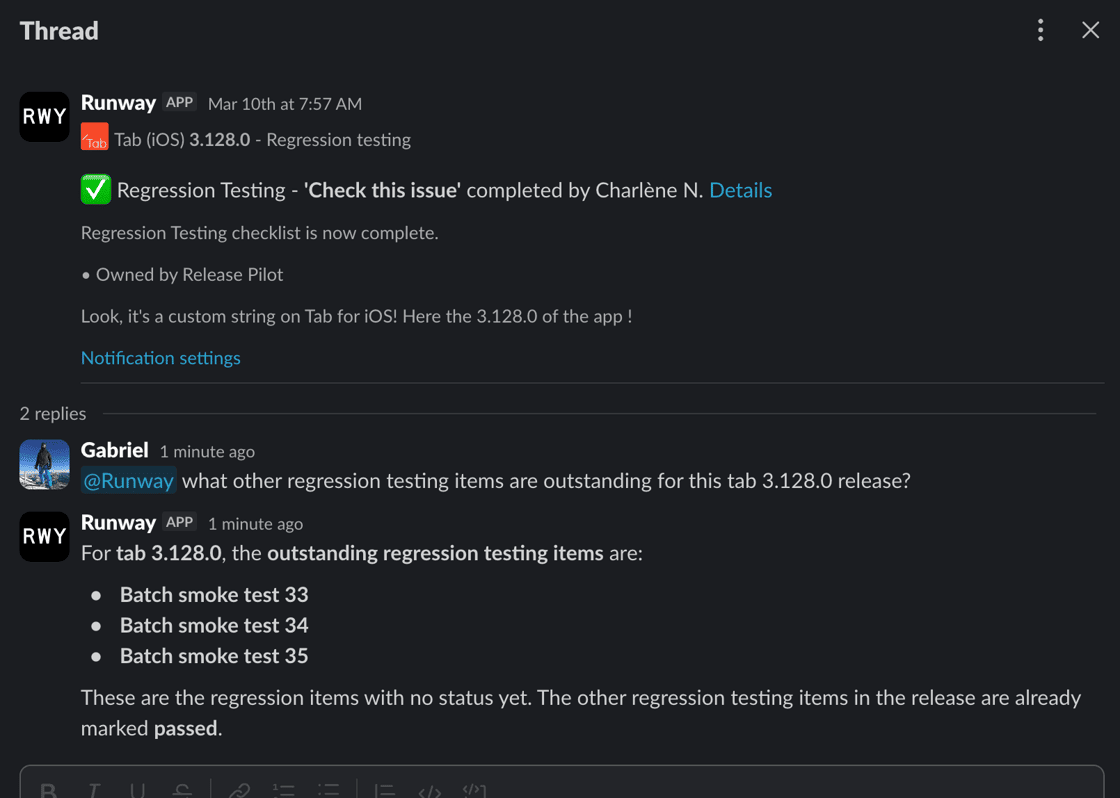
Many of you are already chatting with Runway's Release ATC chatbot in DM, asking it for release info, status updates, and even having it handle certain release tasks for you. We wanted to make this kind of interaction available beyond the confines of a one-on-one conversation, so you can now pull Release ATC into any channel or thread and leverage it as a team. The same granular permissions apply, so you can be confident that anyone taking write actions will only be able to do what they’re allowed to do.
Configure automations per release type
Previously, automations supported a single configuration which would apply for all release types — normal releases, hotfixes, and rollbacks alike. We’ve now shipped changes that allow you to configure automations discretely per release type, determining not just whether they’re enabled or disabled in those different contexts, but also controlling any automation-specific options that a given automation offers. For example, you might want your auto-submit automation to run with one set of trigger conditions for regular releases and a lighter set or even full “submit on green” for hotfixes. Or, set up a shorter customized staged rollout schedule for hotfixes and disable staged rollouts altogether for rollbacks.
Just-in-time, automatic re-signing to allow new devices to install ad hoc builds
Apple doesn’t make it easy to distribute ad hoc builds, and all the overhead involved in registering devices and managing provisioning profiles and signing discourages teams from doing as much with internal distribution as they otherwise might. Runway’s automatic device onboarding and management as well as provisioning profile regeneration already help remove a lot of the friction, and our latest Build Distro re-signing automation eliminates much of the remaining complexity. Now, if a user tries to install a build with a new device which wasn’t included in the provisioning profile that build was originally signed with, Runway can detect that, sync the device and generate a new provisioning profile if needed, then re-sign the original build and redirect the user straight to install. The whole process typically takes a matter of seconds.
Automatically manage a dynamic release pilot Slack handle
Many teams maintain a Slack handle for their rotating release pilots so team members can easily ping @ios-pilot, for example, and reach the right person without needing to hunt them down. This normally requires constant manual work to assign and reassign the right pilot at the right time, but Runway can now manage a pilot handle for you, automatically updating the associated Slack user based on your release schedule and pilot rotation while also accounting for any swaps or schedule changes.
Build Distro improvements: new filtering for bucket rules, custom bucket ordering, easier navigation on mobile, and more
We shipped a number of changes in Build Distro to give teams even more ways to group builds automatically, get builds in front of the right audience, and improve the experience on mobile. On PR-based buckets, you can now configure filtering based on labels, automatically including or excluding builds associated with PRs that have (or don’t have) certain labels set. We’ve also added the ability for teams to set an explicit ordering for their Build Distro buckets in the main bucket list view — for now this is configured on our backend, so reach out if you'd like your buckets reordered! Testers accessing Build Distro on mobile will find improved navigation including a search bar to help with switching between a large number of apps. And, teams that push builds up to Runway via our API can now optionally include PR info in order to take advantage of the additional functionality that’s otherwise available with a fully-integrated, PR rule bucket (e.g. the automation that posts build info and install links as comments on the corresponding PRs).
Redesigned main navigation
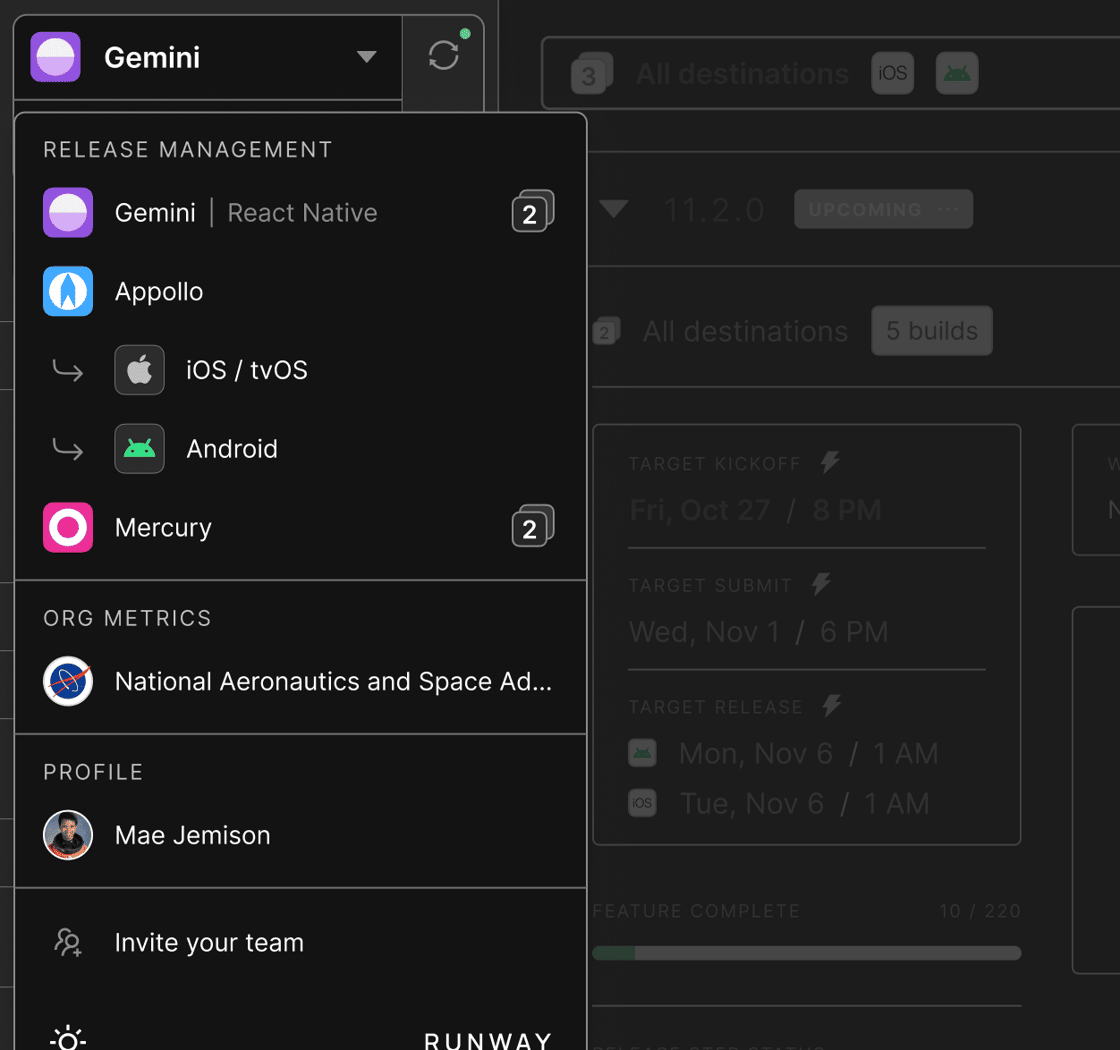
We reworked Runway’s main sidebar to make navigation around the platform faster and more intuitive, especially for organizations with many apps and for stakeholders who need to manage releases across multiple platforms. Now, you should be able to navigate between any apps in your org and any releases within those apps in just one or two clicks. The new navigation also makes it easier to jump up a level and access key areas like Org overview and Org settings.
Share public install links in build notifications with configurable expiration
To make it easier for folks who aren’t Runway users to get their hands on certain test builds, you can now optionally add public install links to the notifications that are sent when new internally distributed builds become available. To keep things secure, you have the new option of adding expiries to these links, either based on number of installs, time elapsed, or both.
New Feature Readiness filter to view changes in specific builds
Runway’s Feature Readiness view is your single source of truth when it comes to the work your team is shipping with each release, pulling together code changes, project management tickets, build info and more. But teams often want this kind of complete picture not just for the full release diff, but also to visualize changes from build to build over the course of a given release cycle. The new “Item is new in RC build” filter now lets you do just that, surfacing only those changes which were new in any specific build you select.
Expanding our MCP server and public API with new tools and endpoints
We’ve shipped a number of new tools for Runway’s MCP server, as well as new endpoints for our public API. On the MCP side, you and your favorite agent can take additional actions like setting and updating the selected app store build for any release, query adoption rates by version, and pull any and all health monitoring metrics found within a release’s Rollout view or across multiple releases via Org overview. On the Runway API side, we’ve added endpoints that allow you to create regression testing items as well as update their status and add comments (useful for integrating with external automated testing tools). There are also new endpoints for pushing user roles and groups to Runway (helpful for teams using AWS IAM or other identity providers that aren’t compatible with Directory Sync) and for uploading app icons when provisioning new apps via Runway’s config-as-code. To help you stay on top of rate limits and usage across your team, we now show consumption per API key in Org settings.
Set notification channels per checklist item
Previously, notifications related to checklist, regression testing, and approval items (e.g. for status updates and commenting) were all directed to a single channel configured in app-level notification settings. You can now configure a specific channel override in each individual item’s settings, and all comms related to that item will go to the selected channel. This is particularly useful for routing reminders and updates to the right stakeholders — e.g. marketing sign-offs to #marketing, leadership review to #mobile-leadership, specific testing gates to the right QA group, etc.
More flexibility in AI-generated release notes with customizable prompts
There are a few places in Runway where you can leverage AI to auto-generate a release summary or release notes based on the changes (both code and project management tickets) shipping with the release. Our built-in prompts are tuned for this purpose, and we offer a couple of different defaults (e.g. targeting internal versus external audiences). But to give teams even more control over the end result, we introduced the option to add additional text to the prompts that are used, so you can adjust content and tone as needed.
Require multiple approvers on fix requests
For teams with stricter sign-off requirements on fix requests — e.g. if you need both a tech lead and a product owner to OK late changes before they’re pulled into a release — you can now configure multiple approvers per fix in your fix request settings. In the Feature Readiness step fixes will surface at-a-glance progress towards approval completion, and for notifications you can choose whether to be notified for each approval (or rejection) that comes in or only when the overall approval status changes. Either way, every individual approval action is captured as a timeline event so you have a full audit trail.
Tag user groups in Microsoft Teams notifications
For teams leveraging our Microsoft Teams integration for notifications, you can now @mention user groups via tags. Based on a mapping you define between your user groups in Runway and tags in Teams, Runway will expand any group mentions you add to notifications (which can be configured per notification type and on things like checklist or regression items) to ping the right folks on the Teams side.
More options for managing access control with app membership inheritance from user groups
To make it easier to manage your team’s access in Runway, we added the option to have a user’s app membership inherit from the user groups they are a member of. In user groups settings, you can now map a given user group to one or more apps in your org. Any users who are members of that group will also be automatically granted membership of the corresponding apps, removing the need to configure both user groups and app membership separately for each user.
New integrations: Statsig, Rootly
Statsig joins LaunchDarkly and Optimizely as a supported feature flagging integration in Runway. Once connected, like with those other integrations, Runway will surface a focused list of relevant flags alongside each release with status, targeting rules, variations, and other context included. Runway diffs this flag data over time to capture any and all changes, then overlays that info on top of rollout metrics charts to help you spot app health issues that are caused by flag updates, not just new binaries.
We’ve also added Rootly as a supported scheduling integration. Similar to our other scheduling integrations, Runway will sync with your on-call schedules and map those to your release pilot rotations in the platform, automatically assigning pilots to releases and handling swaps or schedule changes where needed.
Release ATC: an AI-powered chatbot for release info and actions
We're very excited to announce Runway's new Release ATC: you can now chat with the Runway Slack app in DM to get all your release questions answered and even take actions on releases.
We wanted to make it dead simple for anyone on your team to access everything Runway knows about your releases and to handle tasks needed to move release cycles forward—without them having to leave the one tool they use most for day-to-day collaboration and communication. Access is scoped by Runway's granular user permissions, so everyone automatically has the ability to do exactly and only what they're allowed to do, with no extra oversight needed.
To get started, just open up a DM with the Runway Slack app and say hello!
New tabular views to see release data across multiple apps and releases at a glance
We've rolled out a new style of tabular view at both the org and app level that lets you quickly scan release information and status across multiple apps and releases—even dozens of them—all in one place. You can customize exactly what data is shown, making it easy to focus on the metrics and information most relevant to your team. This is especially useful for stakeholders who need the bigger-picture view across a mobile org, and for cross-platform teams or those that manage whitelabel apps.
Currently available in closed beta — reach out if you’d like early access.
Add custom content to any notification
Sometimes you need to include additional context or instructions in the notifications Runway sends, beyond what’s included by default. You can now append custom text to any notification, and with Runway’s pattern tokens this custom text can be dynamic, allowing you to pull in relevant information like build numbers, release pilot names or even work item diffs.
Powerful new options for customizing how and when automations run
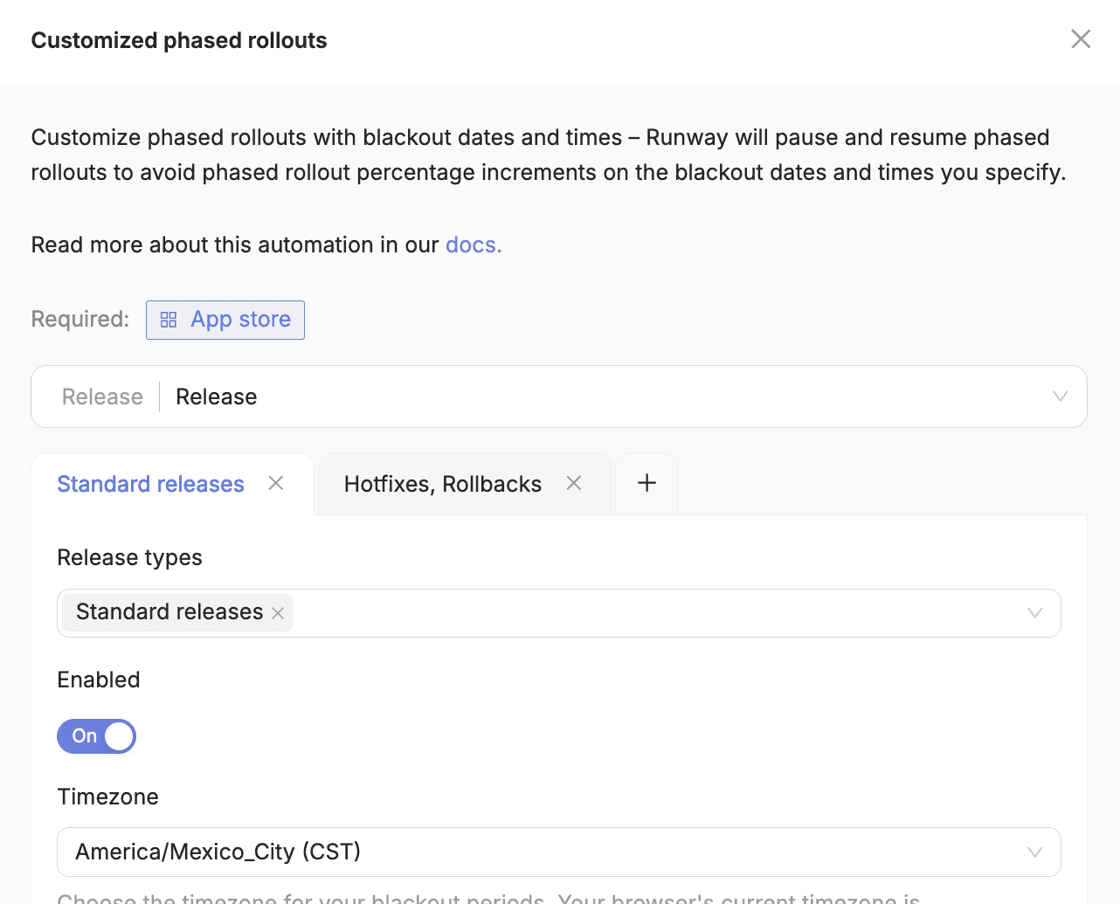
You now have much more control over Runway’s automations with a number of new ways to configure them beyond their default behavior. Target deadlines can be set per automation such that they trigger at specific times relative to your release milestones – for example, run a particular CI workflow four hours before your scheduled submission, or start auto-assigning testers to beta builds 12 hours after your release kicks off. Or, configure gating conditions that require previous release steps to be completed before an automation proceeds. You can also combine both approaches, running an automation with specific timing but only if certain steps are “green”. And, you can now also control which release types a certain automation can run for, giving you even more ways to segment your process between normal releases and hotfixes.
More ways to filter Feature Readiness for monorepo teams
Because the Feature Readiness view in Runway defaults to showing a full release diff—from previous tag to HEAD of the release—teams using monorepos will find that a lot of items unrelated to the app in question are included. In addition to the filtering that’s already possible via the Feature Readiness UI, there’s a new way for monorepo teams to configure more permanent filtering that will cause Runway to only surface items whose commit messages, PR titles, or PR labels contain certain keywords. Unlike the UI-based filtering, this also ensures that downstream automations on Feature Readiness (e.g. auto-applying labels or fix versions to project management tickets) only act on the correct subset of items.
Automatically pause your release schedule and automations during code freezes
Are you a retail app heading into Black Friday or a sports app heading into the Super Bowl? Instead of needing to manually disable your release schedule and related automations (e.g. auto-kickoff, submit, and release) in Runway, you can now configure “lifecycle freezes” that will automatically put your train on pause during selected dates. Once outside the window, Runway will either resume the in-progress release or kick off a new one based on your schedule.
Safeguard build selection based on regression testing results, and more options for regression testing behavior
Runway’s automatic app store build selection is an efficient, hands-free way to ensure you’re always ready to submit, but if your team tends to distribute many builds to the stores, you need to be very clear and careful about which one is the final RC that you want to ship. You can now configure the build selection automation to “lock” to whichever build is selected and marked as passed on the Regression Testing step, rather than always defaulting to the latest available build.
To give you more ways to manage how regression works within Runway, you now have four different options for how the Regression Testing step behaves when it comes to builds and statuses. You can choose to have the step clear the currently selected build and regression status whenever a new build is detected, automatically update to any new build and reset status to "In progress," keep build and status selection manual, or disable explicit build and status selection entirely and let Runway determine the overall regression result based on individual regression testing items you’ve configured.
Early warnings and more control over rollout health alerting
We’ve made some updates to our popular rollout health alerts to give teams an earlier indication of impending problems and to help avoid any signal-to-noise issues. Now, for any given health metric you have configured, you can opt in to receiving warning notifications if they approach within 10% of their unhealthy threshold, in addition to the usual alert if they actually cross into unhealthy territory. In the notification’s settings, you can also configure exactly when these alerts should start sending based on adoption percentage or day of rollout, allowing you to fine tune your signal-to-noise ratio based on sample size.
A new, more configurable strategy for automated backmerges
Runway’s backmerge automation now supports a third backmerge strategy. In addition to options to backmerge all changes once at the end of the release cycle or backmerge continuously per change, you can choose to cherry-pick changes continuously from the release branch to your working branch branch. This approach gives you more control: you can configure the automation to skip certain kinds of pull requests (e.g. late changes that were pulled over from your working branch in the first place), or skip changes that affect certain file types that you don't want backmerged (e.g. avoid backmerging unsquashed PR commits in favor of the merge commit only). As always, if merge conflicts occur, Runway will notify you and create a timeline event so you can resolve and move on.
Bookmark-friendly URLs that automatically resolve to the right release
For folks that want to save quick links to their most top-of-mind releases—perhaps to add to some internal documentation, to pin to a Slack channel—a new kind of dynamic URL is available. Instead of bookmarking and then re-bookmarking specific releases, you can now use special path parameters like next and live to always be taken to the correct place. For example, …/releases/live/rollout/summary would always take you to your current version’s rollout page. For folks that are in-office, this is especially useful for throwing Runway dashboards up on a big screen.
Manage release checklist items at the org level for all of your apps
To make it easier to manage parts of your release process that should be standardized across multiple apps, you can now create and edit checklist items at the organization level. Org-level checklist items automatically populate to all releases across all apps in your org, eliminating the need to manually recreate checklist items that each app has in common and keep all of those updated if they need to change along the way. This is particularly valuable for teams with standard compliance, legal, or other sign-off tasks that should be part of the release process for all apps.
More ways to pull fixes into releases and manage the fix lifecycle
We’ve enhanced Fix Requests and cherry-picking in Runway so teams can pull in fixes earlier in the development lifecycle, track those fixes more easily, and clean them up with less manual effort. First, you can now get fixes on the radar as soon as you know they’ll be needed for a particular release—well before work on them has necessarily started—by selecting from among any and all project management tickets in the fix creation flow, not just those already associated with the release and regardless of whether code changes already exist. If needed, Runway can also automatically apply the appropriate fix version or label for the release in question when you create a fix this way.
Other changes make it easier to manage and track the lifecycle of fixes. Now, if an engineer removes a cherry-pick token from the title of a PR associated with a fix (maybe the fix is no longer needed or it won’t be shipping with the release in question), Runway will automatically remove the fix and post a timeline event explaining what happened. In situations where multiple project management tickets are referenced by the same code item and that code item is part of a fix, Runway now associates both tickets with the same fix, rather than creating separate fixes for each ticket. This prevents issues where duplicate fixes could be out of sync or where PR status checks might be overwritten.
New integrations: Apple Power & Performance Metrics, Jira Service Management
We have a new 'Observability & Analytics' integration available. Connecting Apple Power and Performance Metrics in Runway allows you to monitor launch times, memory and battery usage, terminations and more, and configure alerting and rollout automations based on defined thresholds. This gives you another data source to help catch performance regressions before they impact your users.
If you use Jira Service Management for on-call scheduling, Runway can now integrate with JSM to automatically manage your release pilot rotation based on your JSM schedule. This requires that you also have Jira connected as a project management integration, but once set up, your release pilot assignments will automatically stay in sync with your broader on-call schedule without any manual updates needed.
Even more granular app-based access control
By default, all users in a Runway org have at least read-only access to every app in the org. For many teams this works well, since they don’t mind that all teams and stakeholders are able to see what everyone else is up to, even if they’re not directly involved in a given app’s releases. But we also understand that there are situations in which a team would want app access to be locked down more. Building on top of Runway’s app membership functionality, we’ve introduced a new optional setting that, when enabled, requires that a user be a member of an app in order to even view any of that app’s data. If a user does not have access to a given app, they won’t even see it in Runway’s navigation.
Automatically pull a previous submission when skipping a release
The “skip” functionality in Runway offers a quick way to move past a given release cycle if you’re no longer going to ship that version to prod (if a critical bug was identified during regression, say, and you’ll fix forward in the following release instead of delaying the previous). There are a number of automations that run when you skip a release, to ensure that state is correctly cleaned up across all the tools involved, and we’ve added another option to help you move past a problematic release even more seamlessly. Now, when skipping a release on the Apple side, you can have Runway automatically pull any previously submitted build, since that would otherwise block your ability to move on to the next version.
More accurate release calendar predictions for accelerated rollouts
The release calendar views in Runway – and resulting data synced to your team’s internal release calendar, if integrated – are designed to not only surface concrete release milestones but also upcoming release and rollout timing based on historical data. This is especially helpful for managing stakeholder expectations around version availability, but for teams with Runway’s rollout acceleration automation enabled, the calendar’s illustration of rollouts could be misrepresentative. Now, if your team has Runway configured to accelerate stable releases to 100%, the release calendar will factor that in and display the optimistic rollout schedule assuming acceleration (with messaging alongside to make that clear).
More ways to navigate automation and notification settings
We understand that managing your Runway automation and notification settings can be tricky, especially as our list of available automations and notifications grows. To help with this as well as improve discoverability of new automations and notifications your team may want to leverage, we added new sort options to Runway’s automation and notification settings pages.
Get release info and take actions right from your favorite AI agent with our new MCP server
There’s a powerful new way to integrate with Runway and manage your releases through our MCP server. You can now point Cursor or Claude or [insert your other AI agent of choice] to Runway and ask questions like "What's our next scheduled release?", "How healthy is our latest app version?", and "Which team members are part of the Checkout user group?" You can also tell your agent to take actions: "Update the current release's regression testing status to 'passed'", "Add 'Here's what to test' as tester notes on our latest nightly bucket build", or "Complete the 'Sync with marketing' checklist item for our next iOS release." Access to MCP tools is granularly scoped just like our API, so you can give just the right level of permissions to different team members. See our docs for more info.
Workflows project: support for CI, Metadata, Screenshots, and Rollout steps
As a reminder, our ongoing Workflows project is a wide-ranging rebuild of Runway’s foundations, unlocking many more ways to configure and customize the platform to cover new use cases and different ways of releasing. We’ve shipped another set of important release steps under the new Workflows experience, with support now for multiple CI, Metadata, Screenshots and Rollout steps in a single release sequence. Arrange steps in parallel to streamline cross-platform or whitelabel use cases, where you might want to manage metadata and screenshots across multiple stores in one place, for example. Or you can add multiple steps in serial, to integrate different CI workflows at different stages of the release lifecycle, or monitor both beta and production rollouts.
If you’re interested in trying out the Workflows beta for your apps, get in touch!
Minimize the long tail of users stuck on old versions by automatically accelerating prior releases to 100%
Depending on your team’s release cadence, it’s not uncommon to have a given version going live while a previous version isn’t yet out to 100% of users. To avoid exacerbating mobile’s already tricky “long tail” problem and reduce the number of different versions your team needs to support, Runway can help you first accelerate the previous version to 100% (if healthy) before releasing the subsequent one. Now, you can select an option in the release flow that will have Runway accelerate a previous release to all users if not already fully rolled out — whether you’re releasing manually, or leveraging Runway’s release automation.
Get immediate context on new stability issues with event-level data in rollout notifications
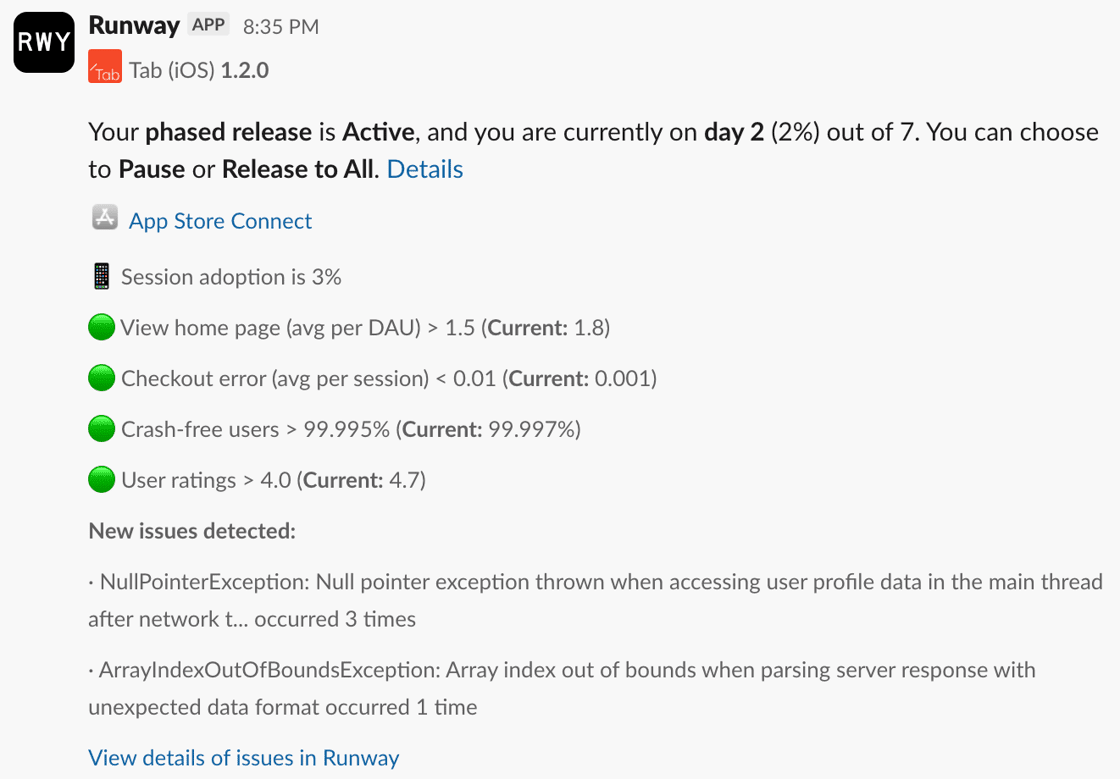
We've added even more info to the rollout notifications that Runway sends, now including specific event-level details on crashes and exceptions to complement the aggregate health metrics we already surface and help your team triage emerging issues more quickly. When you enable the corresponding option in the rollout notification settings (enabled by default), each notification will include a bulleted list of new and trending stability issues identified via your stability monitoring integration, complete with descriptions and occurrence counts.
New warnings to help you avoid accidentally shipping without important late-arriving changes
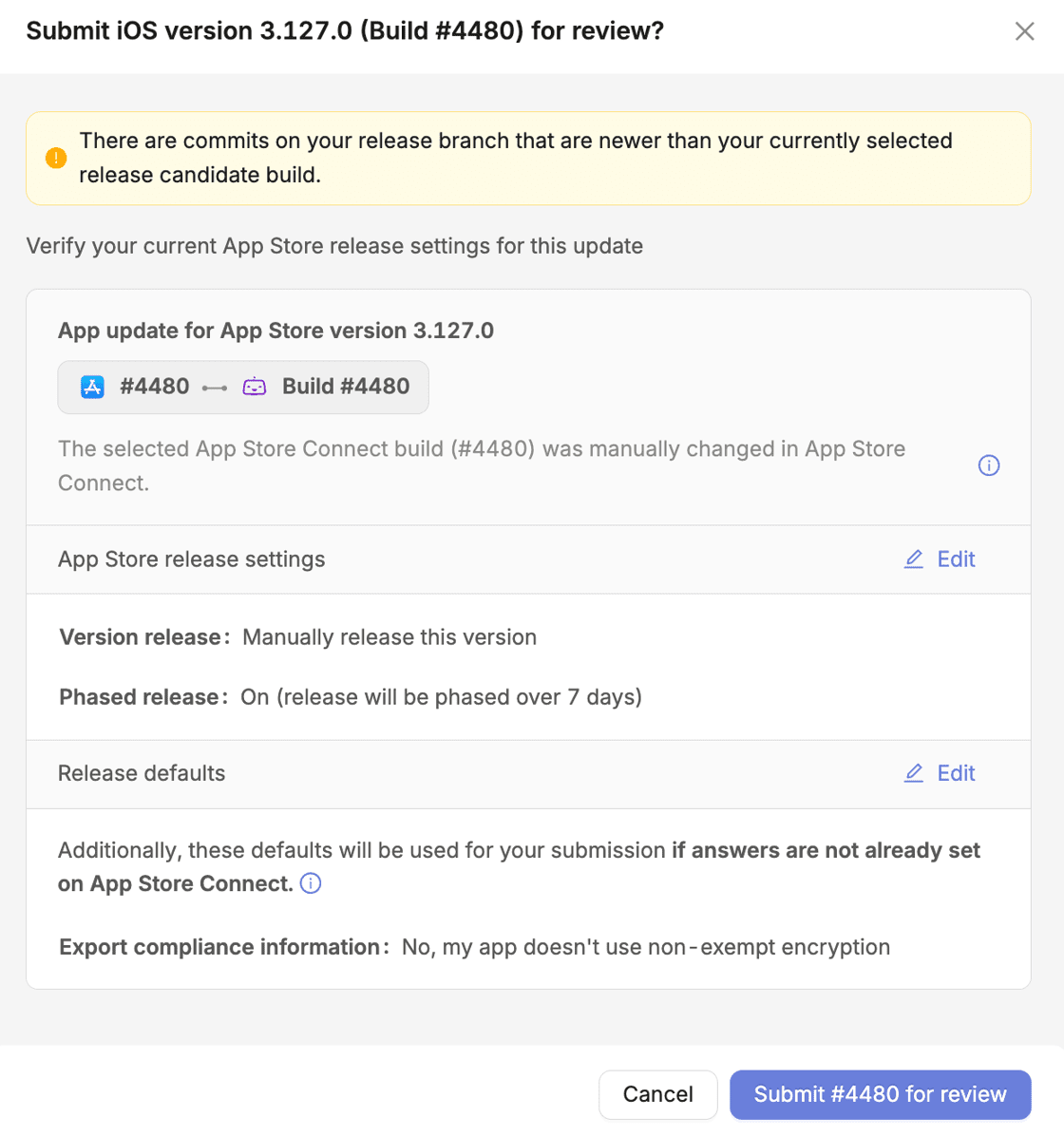
Late-arriving commits can be easy to miss, and it’s important to ensure your team doesn’t accidentally submit (or, worst case, release) an incorrect RC build that was generated before the late changes landed. Runway now continuously checks whether there are newer commits in your release diff that aren’t contained in the currently selected RC and will display a prominent warning on the Submission step if so. The submit button will remain enabled so you can still move forward if needed, but you'll have context to decide whether to select a newer build first. (Depending on your team’s specific workflow, leveraging Runway’s ‘select latest build’ automation could also help safeguard against this kind of situation!)
Keep stakeholders in the loop even if they're not in Slack or Teams — or Runway — with expanded email notifications
Previously, Runway’s email notifications were managed at the user level: to receive emails, you would need to be a Runway user and handle your own notification settings per email type. Now, to make it much easier to send certain comms to people on or outside of your team, you can enable email notifications for any company-owned addresses, whether or not they correspond to a Runway user, and manage those settings in one place alongside the rest of your app’s notification settings.
Reduce noise in Slack with additional threaded notifications
We already support threaded notifications for fix requests, and we’re now expanding threading to other notification types: phased rollout progress updates and notifications related to regression testing items. When the threading option is enabled, notifications that are related (e.g. multiple rollout updates for a given version, or status changes or comments on a given regression testing item) will be sent in a single thread rather than posted as separate messages in your channel. Note that critical notifications like those for phased release halt and resume will use the “Also send to channel” option to ensure maximum visibility.
More ways to generate rollback builds
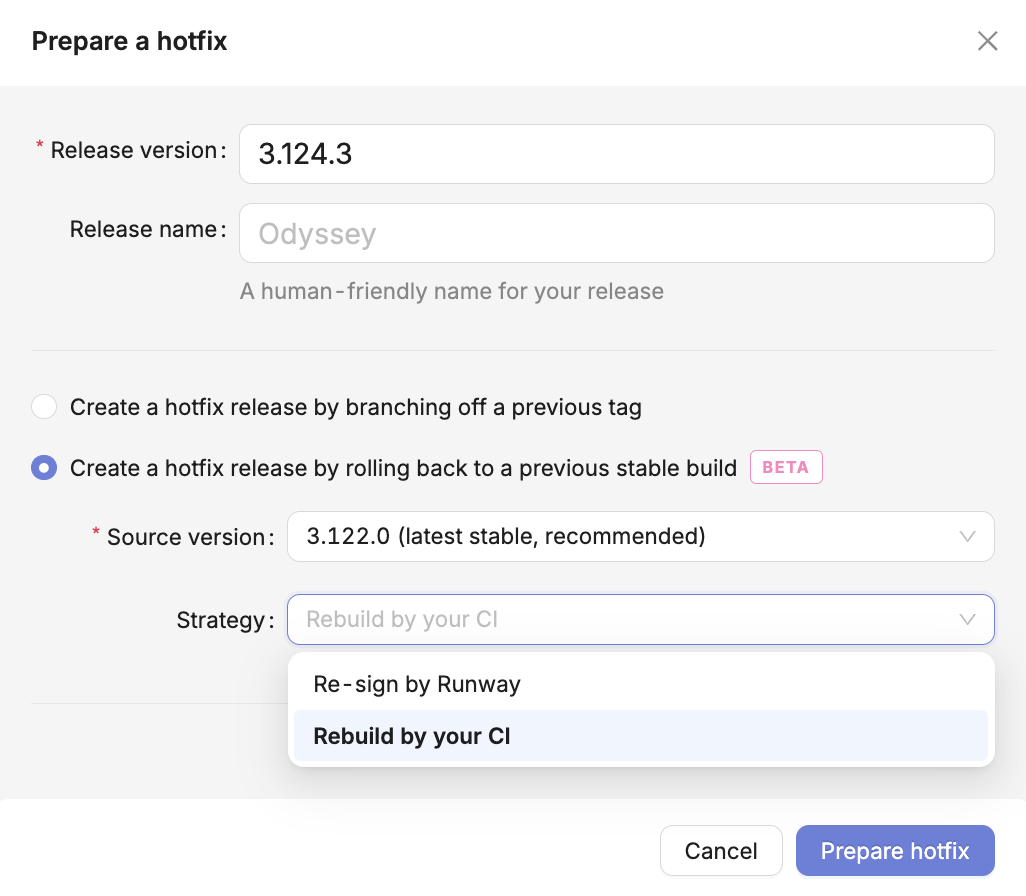
Previously, as part of Runway’s rollback flow we prepared rollback builds by re-signing an older, stable build. This is a quick and clean approach, but it comes with some limitations for certain teams. Now, there’s an alternative option for rollbacks, allowing Runway to automatically trigger the appropriate CI workflow on the appropriate commit and use the resulting build as it would a re-signed rollback build.
More flexibility and granularity with user permissions
We've introduced several changes to user permissions and RBAC to give you finer control over who can do what in Runway (and your release process). First, you can now customize the permissions on Runway’s default user groups, making it easy to quickly adjust the out-of-the-box options to suit your team's needs. This can be especially useful for teams who wish to adjust permissions for the release pilot role, which can’t be substituted with a custom user group. Additionally, we've split the permissions for starting staged rollouts and updating them, so you can give team members the ability to initiate rollouts but lock down subsequent rollout changes. On the Build Distro side, admins can now assign the “archive build” permission to other users without granting full admin access.
Better handling for edge cases around completed Android releases
Due to some pesky Publishing API limitations, Android releases sometimes require more handling post-completion, so we’ve added some new ways to accommodate that in Runway. Android releases can now be marked as skipped even after they've been completed, giving you more flexibility in managing your release history. We've also added the ability to un-complete an Android release when needed, as long as the version is still on the production track in Google Play Console.
Start a hotfix’s staged rollout at the same percentage as the previous release
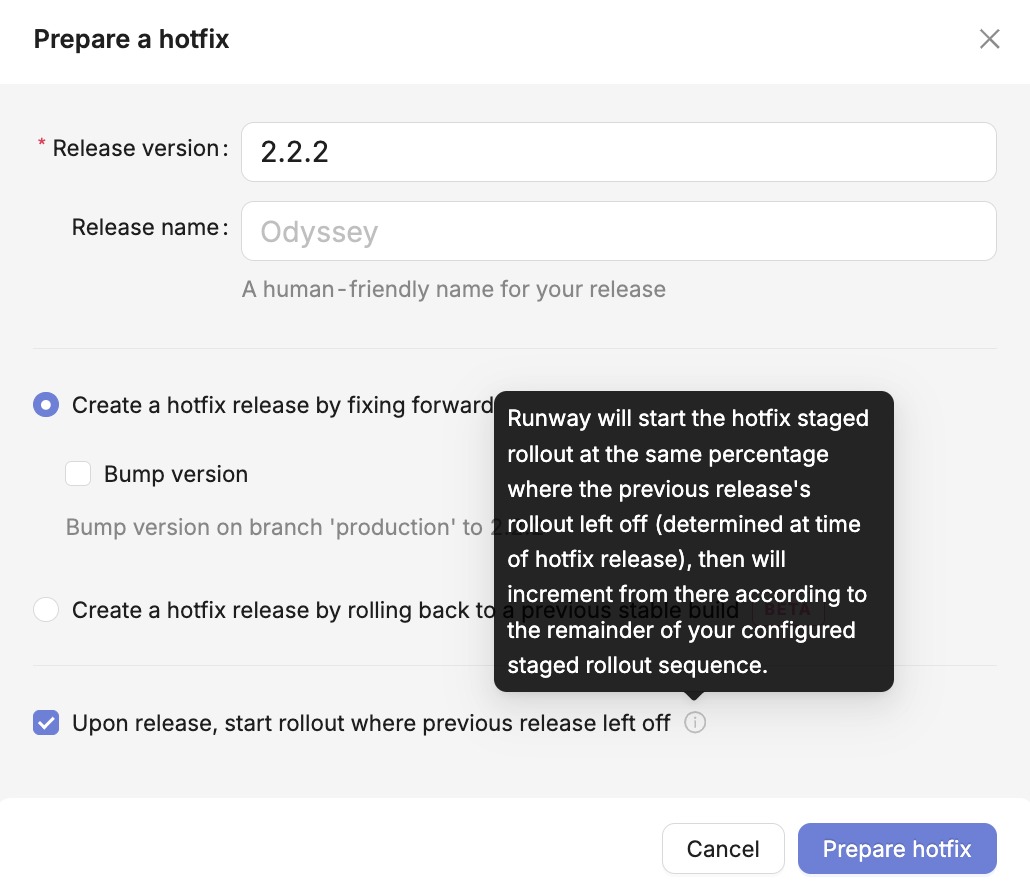
When creating a hotfix for Android, you can now choose to start its staged rollout at the percentage at which the preceding release left off, to match the exposure of the version you’re patching. Runway can then further increment the rollout from there, based on the remaining days of your configured staged rollout sequence.
Expanded functionality for pinging owners on Feature Readiness
We've added more ways to streamline the cat-herding that sometimes needs to happen around feature work. With the “ping” action on the Feature Readiness step in each release, you can now choose to ping all owners of work in the release, not just those with pending items. And when you have filters applied, the ping action will respect those filters and only tag owners of the filtered subset of work items. Finally, to help you understand exactly what action Runway will take, the ping action now presents a confirmation modal showing exactly who will be tagged before the notification is sent.
A new way to integrate unsupported or custom CI
We understand that, due to custom setups or certain other technical constraints, some teams are unable to take advantage of Runway’s out-of-the-box CI integrations. There’s new API-based functionality that supports “push” versus “pull”, allowing teams to instead send build metadata and artifacts to Runway and take advantage of much of the same functionality available as when you have CI integrated ‘natively’.
More transparency and control around integration refreshes
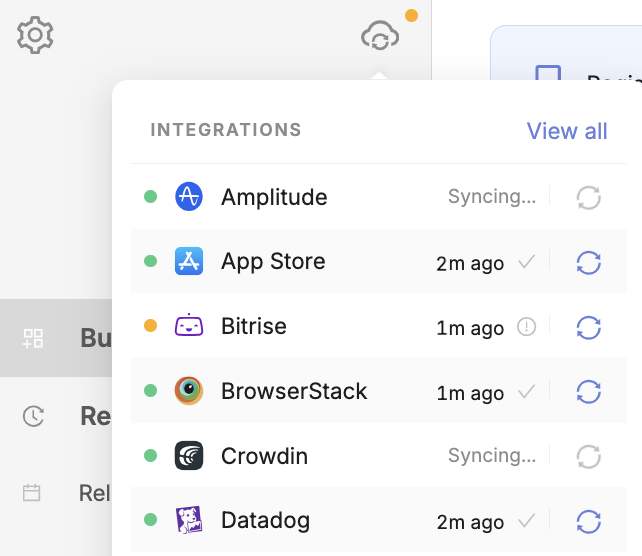
On Runway’s integrations tooltip, you can now see when the last automated, full refresh of data ran for each of your connected integrations, and admins and release pilots can also trigger refreshes manually if needed. You'll see new status indicators if a refresh is already in progress or if you've reached a refresh rate limit.
Improvements to the release calendar for easier viewing and clearer context
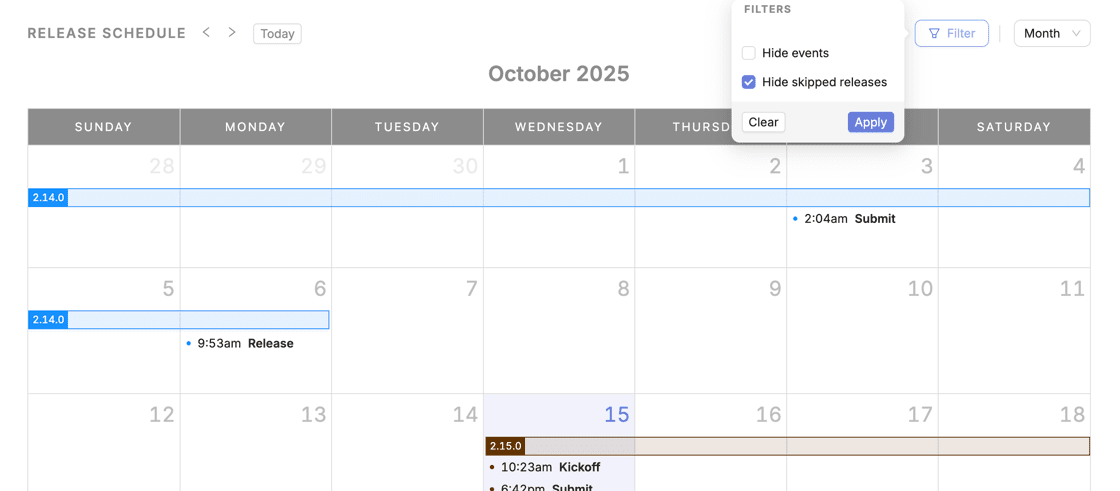
We've made several updates to the release calendar view to help highlight the most important info and give you more control over the presentation. Skipped releases now have lower priority in the calendar items list so that non-skipped releases will be more visible. You can also choose to hide skipped releases entirely from the calendar view. Finally, the calendar will dynamically reorder items based on which release you're mousing over, making it easier to see relevant context.
Receive Slack notifications for Google Play Console rejections
Rejections in Google Play Console are often slow to get picked up on because the notification emails from Google are often sent to one team member’s inbox, or a shared inbox that’s hard to monitor. Plus, the Publishing API surfaces nothing about rejections. Now, if you have email forwarding set up for your Google Play Console integration, Runway can send Slack notifications whenever your app is rejected during the review process. And, as with any notification type, you can tag specific users or groups to ensure rejections are handled as quickly as possible.
Ability to set in-app update priority for Google Play Console releases
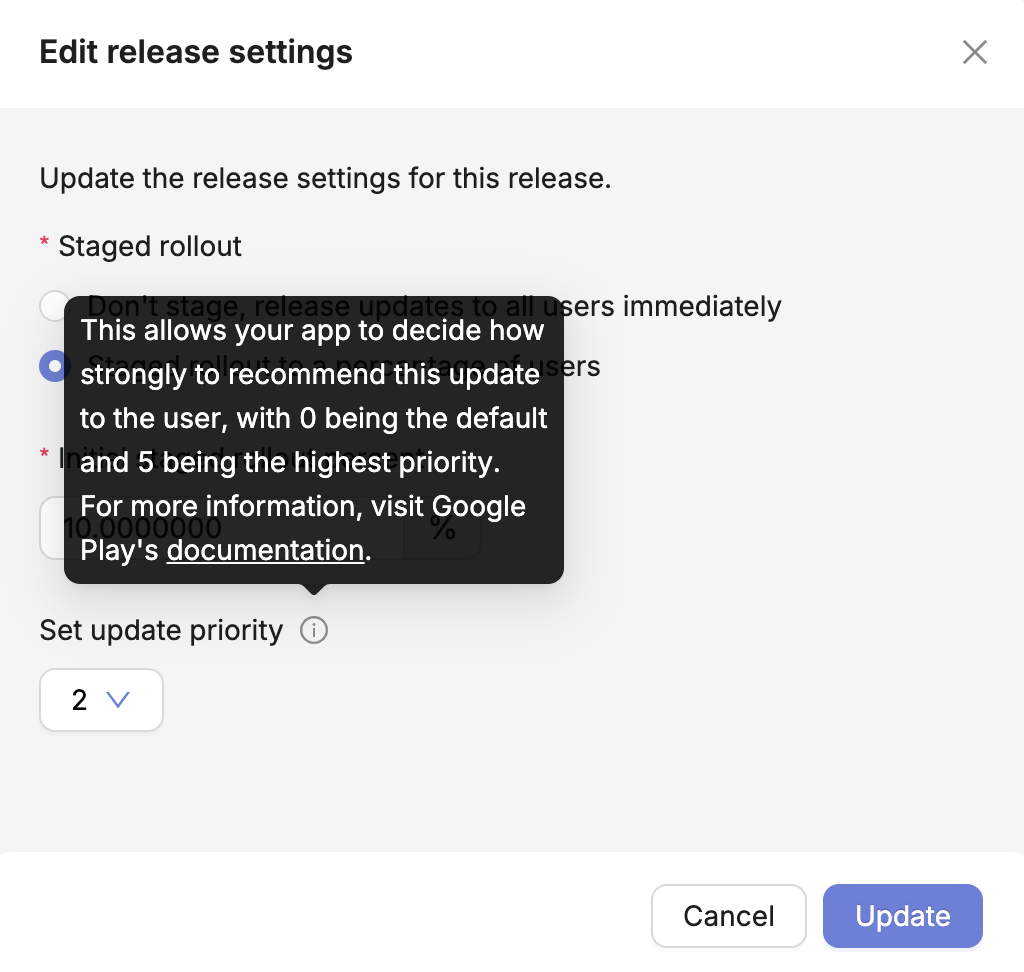
The Google Play Publishing API recently added support for setting the in-app update priority on releases, which is used to indicate how strongly to recommend a given update to users. Leveraging this, you can now set your desired update priority per release without leaving Runway.
An entirely new way to manage cross-platform and whitelabel releases, and more customization for release steps, with our first Workflows project milestone
Up until now, cross-platform and whitelabel teams have managed releases under separate apps in Runway. While our automations helped streamline things as much as possible for teams fitting into these common use cases, we knew the experience could be made even better for shipping “one to two”, and especially for “one to many”. Our Workflows project has seen us rebuild Runway from the ground up to more naturally accommodate the different ways the mobile world ships apps, not just for cross-platform and whitelabel, but for any team wanting to customize Runway further to fit their way of releasing.
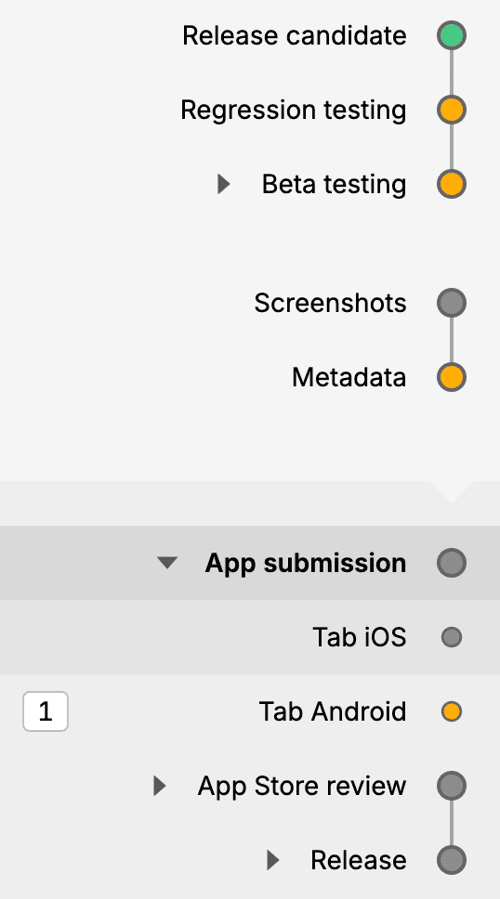
The first big set of Workflows changes to become available in beta allows your team to configure multiple Beta testing, Submission, Review, and Release steps within a given app in Runway. This means a cross-platform team can now set up a unified process for their Android and iOS releases that follows a single pathway from Kickoff until Beta testing or Submission, at which point it splits into platform-specific store steps that allow for managing both sides in one place. Similarly, a team shipping 10s or 100s of whitelabel apps can seamlessly manage releases for all of those in a single workflow.
In addition to “parallelized” workflows like the ones just described, these Workflows changes unlock the possibility of having multiple “serial” steps of a given type. So with the Beta testing step, you can now have more than one of those per release — allowing for a couple of discrete stages of pre-prod distribution, e.g. Alpha and then Beta.
And there’s a lot still to come on the Workflows front, as we expand support to cover more Runway release steps, add the ability to take bulk actions and automate more across steps, and introduce new summary views and overviews.
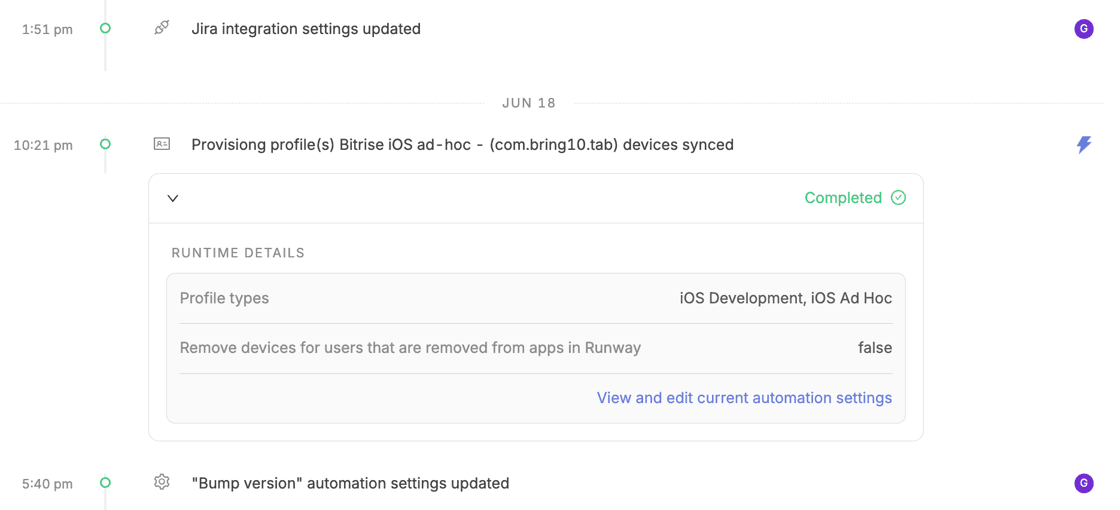
Better visibility into automation outcomes with expanded context and coverage on event timelines
Automation is great for obvious reasons, and it’s a big focus in Runway. However, we recognize that increasing automation in your release process can also introduce more “black box effect”, with lots happening under the hood and less immediate visibility into what’s happening, and why (especially when automations fail). Building on other recent changes to event timelines in Runway — the revamped, dedicated timeline view, filtering, and additional events — we’ve expanded the footprint of automations in timelines.
First, given only a small subset of automations were previously captured in timelines, we reworked all of Runway’s available automations to ensure each one is fully captured in timeline data — whether one-off and release-level, or recurring and app-level. We also expanded the kind of data that’s captured and surfaced, to ensure you have full context alongside each and every automation run. In addition to including more info around status, Runway also saves and surfaces the exact settings that were configured at the time the automation ran.
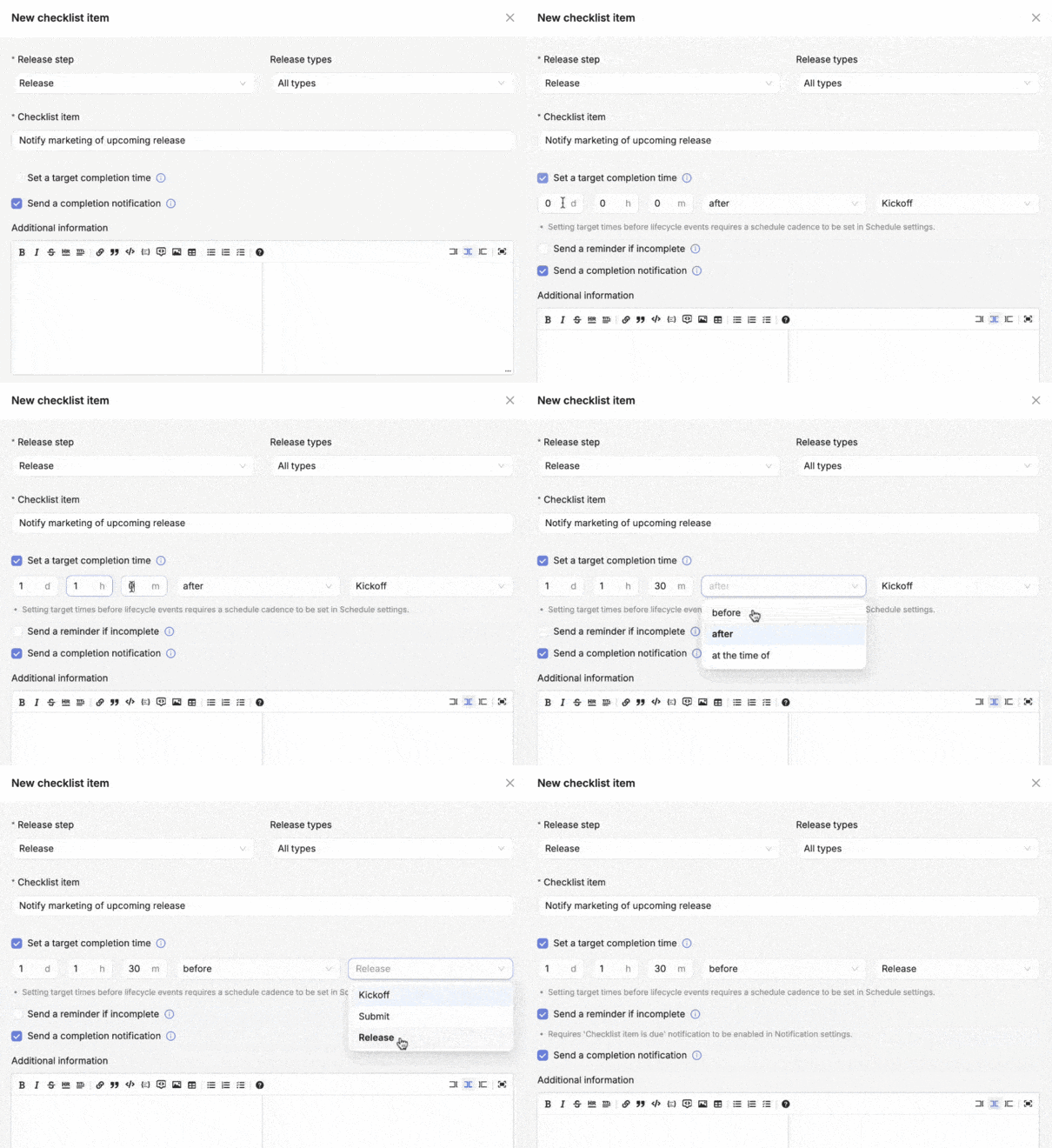
Build out a clearer runbook for your release process with with time-based checklist and approval items
Teams use Runway’s checklist and approval items to capture parts of their release process that can’t or shouldn’t be automated — e.g. certain manual actions or updates that different folks on the team need to take care of throughout a release. You can locate these items in different steps within your release workflow to vaguely position them in time relative to the release cycle. But, the reality is that these kinds of actions often need to be taken at specific moments. You may have a reminder that needs to go out three days before kickoff, and simply having a corresponding checklist item on your Kickoff step doesn’t make that very clear.
Now, you have the ability to attach explicit timing to your checklist and approval items. For example, you could make an item due “two days before kickoff”, “at submission time”, or “one hour after release”. When you attach timing to an item, that timing is surfaced clearly in Runway as a visual reference, and it can also power optional reminder notifications which fire if a deadline arrives and the corresponding item hasn’t been marked complete.
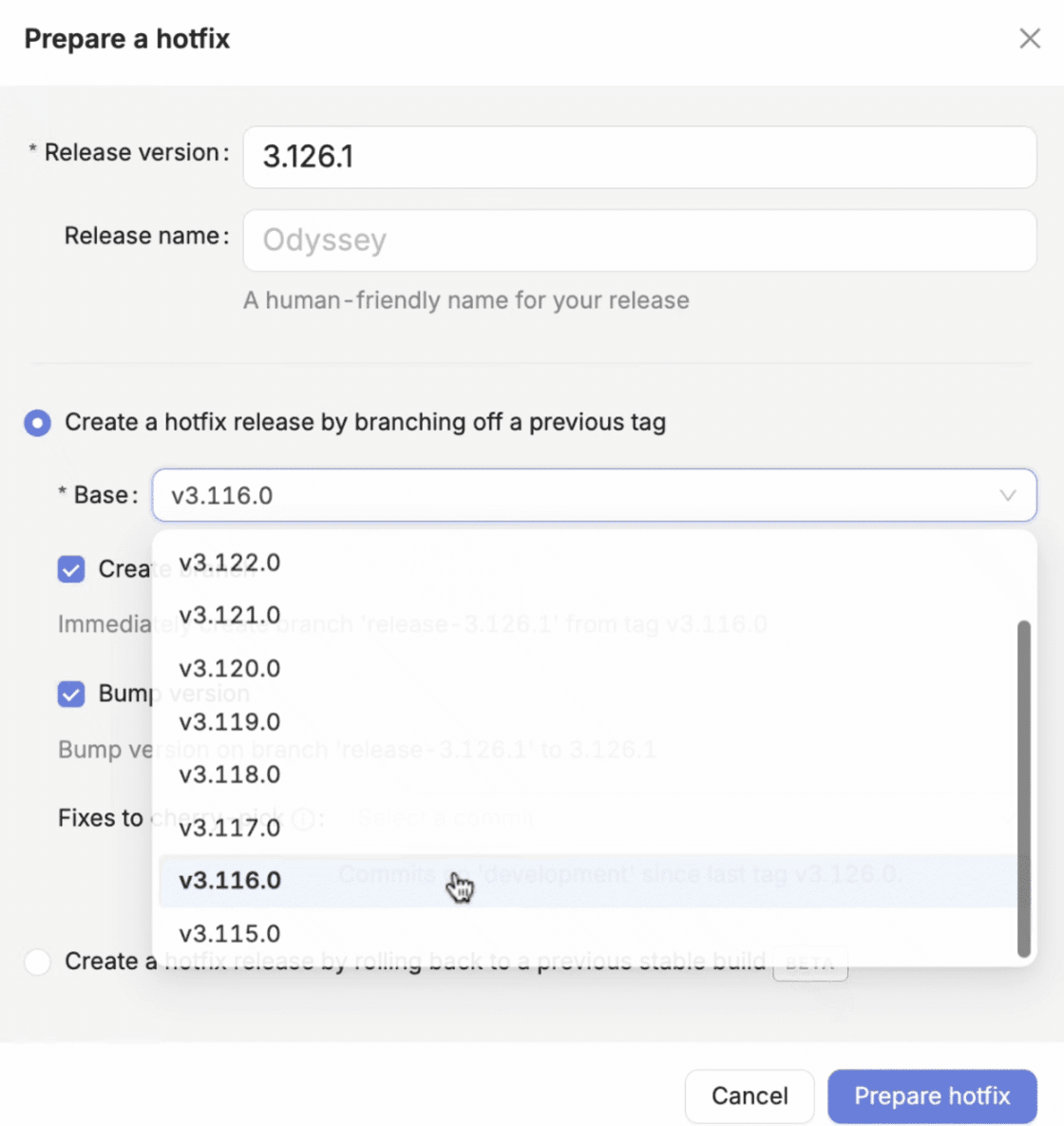
Easily handle more hotfix edge cases, with base selection and freeform versioning
Runway’s hotfix flow is designed to help you get a hotfix up and running as quickly as possible when you need to address a critical issue in prod. You can have Runway cut a hotfix branch off your last tag, immediately bump the version on that branch, and even pull in fixes via automated cherry-picks. There are a few aspects of the flow that we previously constrained to ensure things are quick and consistent, but those constraints made handling certain edge cases less streamlined.
We’ve introduced a couple of changes to the hotfix flow to allow for more flexibility when things go further off the happy path. Now, you can explicitly select the base to cut a hotfix from — so if you need to start further back in history (say you already shipped a hotfix and it didn’t work out, so you want to restart with the ‘parent’ release instead) you have the ability to do that. Also, where Runway would previously hardcode a predicted hotfix version for you, you can now input a specific version number as needed.
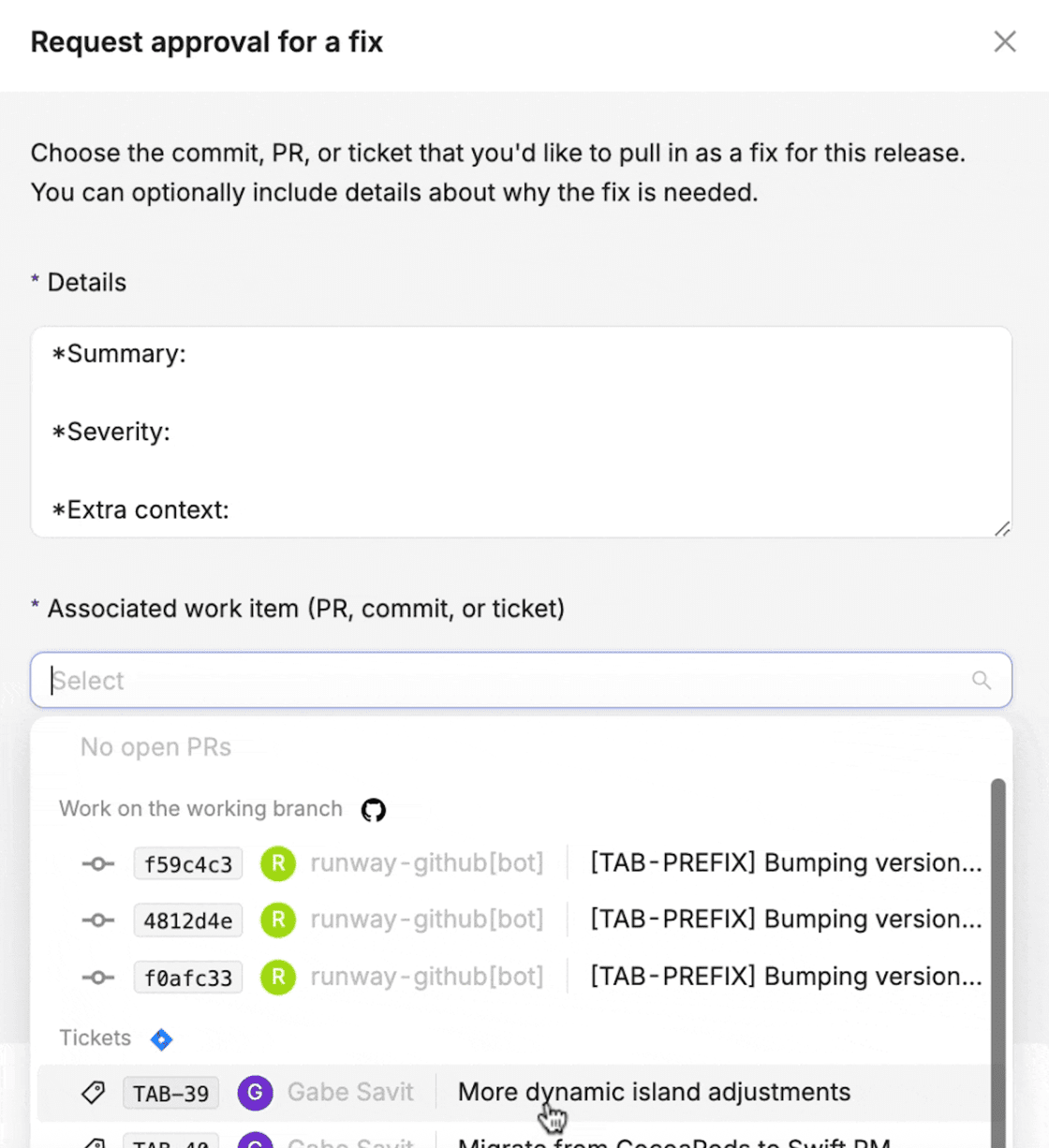
Get late-arriving changes on the radar earlier, and ensure you capture the right context around them, with additional options for fix requests
Many teams use Runway’s fix request flow to safeguard their release diffs, requiring contributors to submit requests when they want to add late changes to a release. Formalizing the process for these requests and making them more visible helps teams stabilize releases better. And the details submitted alongside these requests play an important role, since they help explain why the late change is necessary and give reviewers the context they need to decide whether to let extra work in or not.
A few new changes in the fix request flow make it even more powerful. First, whereas before you could only create a new fix request if the corresponding code change was already in flight (e.g. PR with a fix open against trunk), now you can create a new fix request that references a project management ticket only. This way, you can raise a request as soon as a showstopping issue is ticketed up (and before anyone starts work on it), approve/reject, and track progress across the entire flow.
There are also new settings that give you more control over the details submitted with each fix request. You can now set a details “template” that will be prepopulated in the fix request form, both within Runway and via the Slack flow. This allows you to create sections and specific prompts that requesters will fill in and address. And, you can now make the details field required, so that the necessary context is always submitted alongside each request.
New integrations: Android Vitals, BrowserStack, and Qase
We shipped a number of new integrations at a couple of different integration points in Runway. Android Vitals is our latest observability & analytics integration, allowing you to surface Google-native metrics like ANR rate, slow start rate, excessive wakeup rate and, well, everything else Android Vitals measures. Like any other observability & analytics integration in Runway, you can surface this data during rollouts and define metrics with thresholds for alerting and rollout automations.
We also have two new testing integrations: BrowserStack and Qase. When you connect either of these, Runway will automatically pull in any test runs against a given release, surface live statuses as those progress, and track history across multiple sets of runs if needed. (For other testing integrations like these, Runway can also automatically create your test runs for you, release to release — that functionality will be available in future for these newest integrations.)
Less bookkeeping as you add (or remove) projects in Jira, with automatic project selection
We know that many Jira teams work across a multitude of different projects, and that list of projects is often changing over time. Currently, you need to manually select each project you want in-focus in Runway in your integration settings, and keep the list of selected projects updated.
We’ve added an option on the Jira integration settings in Runway to automatically select all available projects, and keep the list of selected projects updated as projects come and go on the Jira side.
Self-serve support for Bitrise Pipelines
Given Pipelines and builds generated by Pipelines surface differently than Workflows and Workflow builds in Bitrise’s API, support for the former was only possible via a backend config on the Runway side.
To make setup easier for Bitrise Pipelines teams, we brought full support for Pipelines to the Bitrise integration settings UI.
Another option for integrating your team’s Google Calendar
Runway’s Google Calendar integration allows you to automatically sync your Runway release schedules and rollout info to an external team calendar, and also pull any additional events created in your team’s external calendar into Runway’s calendar views.
Google auth can be finicky when it comes to Calendar integrations, and the service account approach was proving difficult for some teams, so we added OAuth as an additional option for connecting Google Calendar. This allows you to integrate with your calendar via an individual user account in your Google Workspace.