Org overview revamp with custom dashboards and AI-powered insights
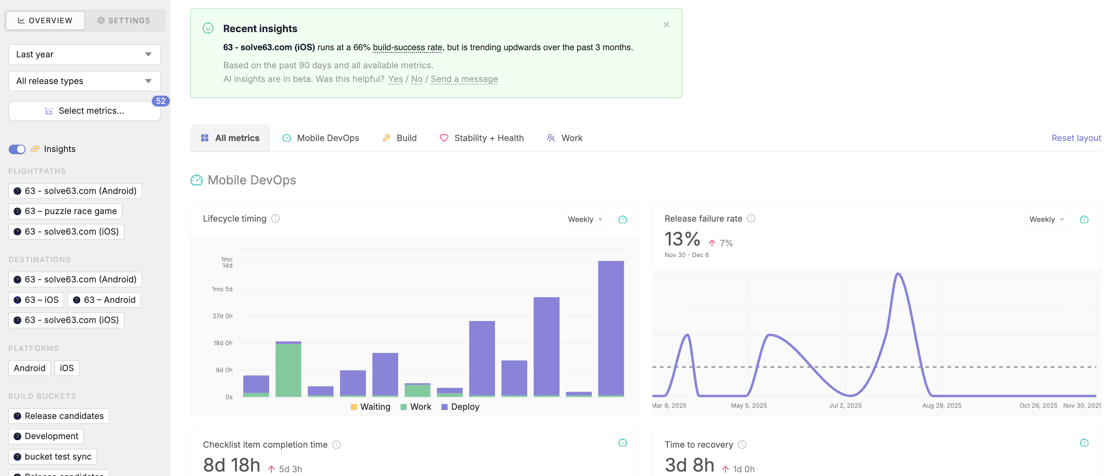
With everything that's changing in how engineering teams build, measuring performance and tracking trends is more important than ever — not just as they relate to your apps and their health, but also your team and how you all operate and collaborate. We reworked the organization-level overview in Runway to pull in even more data, give you more ways to drill in and view trends over time, and help you understand if what you're looking at is normal or needs attention.
You can now customize your Org overview dashboard, rearranging and resizing charts and selecting exactly which metrics you want to surface. Date filters are much more flexible now, you can adjust the aggregation of certain data, and there are new types of filters that allow you to drill down by apps, platforms, teams, and team members where applicable. The different charts available to you have expanded, with new options that include:
Checklist, approval and regression item completion rates (How often is your team actually actioning requisite tasks in your process? How often are test cases passing?)
Target date hit rates (Do you tend to kick off, submit, and release on time? Where do delays tend to crop up?)
Cherry-pick volume and acceptance rate for late fixes (How many changes does your team add post-cut? How often are late changes pushed back on?)
Any or all of the stability and health metrics you have configured for rollout monitoring (How are key health metrics tracking over multiple releases? What are the baselines that should inform where you set your alerting and automation thresholds in the rollout context?)
To help you actually make sense of all this data, we now surface benchmarks sourced from comparable teams and summarize key changes and trends in AI-powered insights at the top of the page, which link directly to the specific charts they concern.
Build size alerting
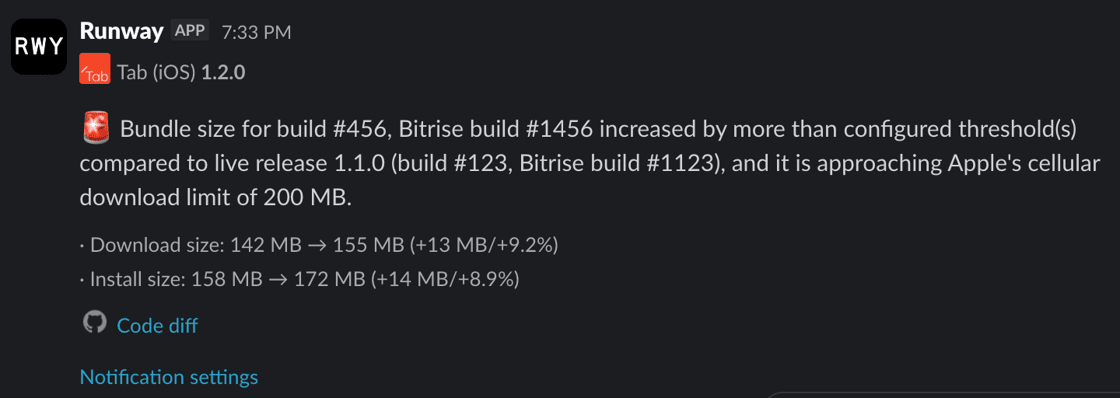
It can be hard to keep tabs on binary size release to release, and even small increases can affect download and install metrics. We’ve added a new type of notification that monitors build size and alerts you if build size increases beyond some allowable threshold compared to your previous release. You can configure the threshold as a percentage or absolute delta, as well as choose to be alerted for all builds that surpass the configured threshold or only the first build in a release that does so. You also have the choice of monitoring download size (Android and iOS), install size (iOS only) or both (iOS). On the iOS side, you can choose a specific device model to monitor if your team prefers that to Universal, and you can also configure an additional alert that fires if your bundle is approaching Apple’s 200 MB cellular download limit.
Support for Claude as AI provider and BYOK
Runway’s AI-related features (e.g. Release ATC, user reviews analysis and translation, release summaries, org overview insights) were previously built on top of and tightly coupled with the OpenAI API. We abstracted that dependency away and now also offer Claude as an alternative provider. Your team can configure your choice of provider in org-level settings, and you can now also drop your own API key in there if you prefer to BYO.
Chat with Runway Release ATC anywhere, not just in DM
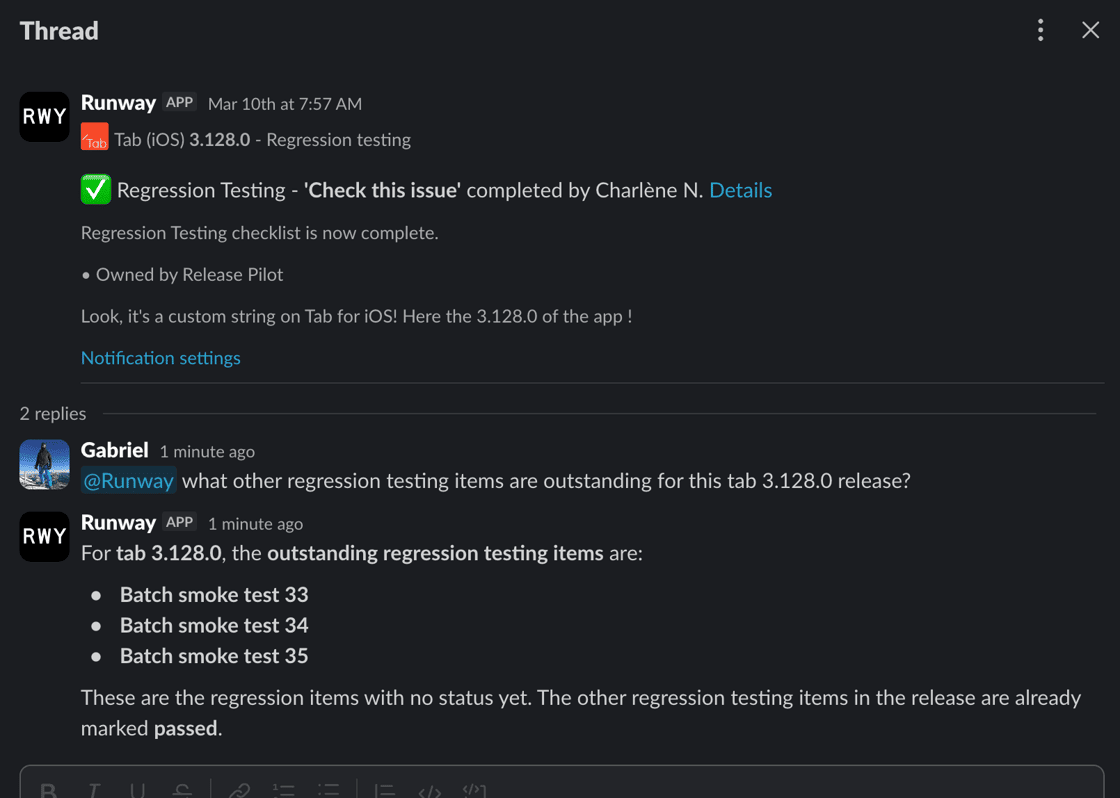
Many of you are already chatting with Runway's Release ATC chatbot in DM, asking it for release info, status updates, and even having it handle certain release tasks for you. We wanted to make this kind of interaction available beyond the confines of a one-on-one conversation, so you can now pull Release ATC into any channel or thread and leverage it as a team. The same granular permissions apply, so you can be confident that anyone taking write actions will only be able to do what they’re allowed to do.
Configure automations per release type
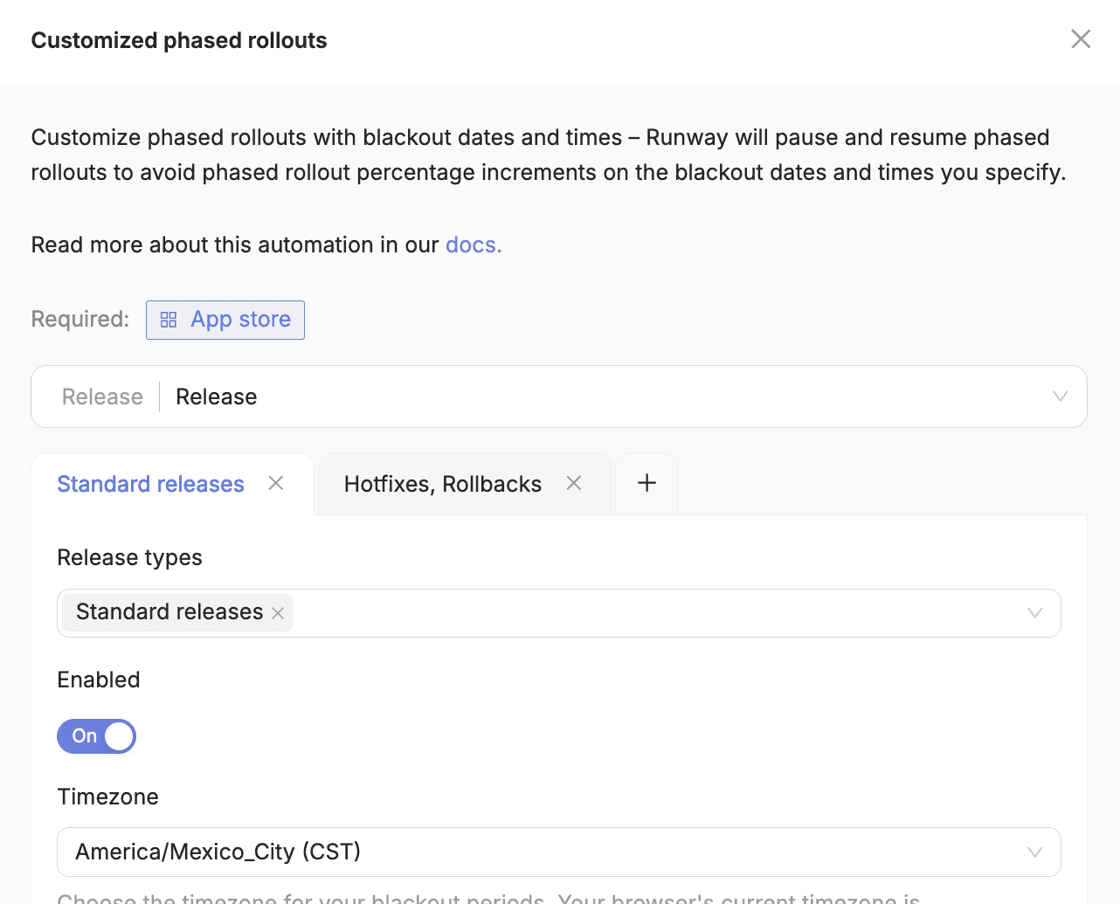
Previously, automations supported a single configuration which would apply for all release types — normal releases, hotfixes, and rollbacks alike. We’ve now shipped changes that allow you to configure automations discretely per release type, determining not just whether they’re enabled or disabled in those different contexts, but also controlling any automation-specific options that a given automation offers. For example, you might want your auto-submit automation to run with one set of trigger conditions for regular releases and a lighter set or even full “submit on green” for hotfixes. Or, set up a shorter customized staged rollout schedule for hotfixes and disable staged rollouts altogether for rollbacks.
Just-in-time, automatic re-signing to allow new devices to install ad hoc builds
Apple doesn’t make it easy to distribute ad hoc builds, and all the overhead involved in registering devices and managing provisioning profiles and signing discourages teams from doing as much with internal distribution as they otherwise might. Runway’s automatic device onboarding and management as well as provisioning profile regeneration already help remove a lot of the friction, and our latest Build Distro re-signing automation eliminates much of the remaining complexity. Now, if a user tries to install a build with a new device which wasn’t included in the provisioning profile that build was originally signed with, Runway can detect that, sync the device and generate a new provisioning profile if needed, then re-sign the original build and redirect the user straight to install. The whole process typically takes a matter of seconds.
Automatically manage a dynamic release pilot Slack handle
Many teams maintain a Slack handle for their rotating release pilots so team members can easily ping @ios-pilot, for example, and reach the right person without needing to hunt them down. This normally requires constant manual work to assign and reassign the right pilot at the right time, but Runway can now manage a pilot handle for you, automatically updating the associated Slack user based on your release schedule and pilot rotation while also accounting for any swaps or schedule changes.
Build Distro improvements: new filtering for bucket rules, custom bucket ordering, easier navigation on mobile, and more
We shipped a number of changes in Build Distro to give teams even more ways to group builds automatically, get builds in front of the right audience, and improve the experience on mobile. On PR-based buckets, you can now configure filtering based on labels, automatically including or excluding builds associated with PRs that have (or don’t have) certain labels set. We’ve also added the ability for teams to set an explicit ordering for their Build Distro buckets in the main bucket list view — for now this is configured on our backend, so reach out if you'd like your buckets reordered! Testers accessing Build Distro on mobile will find improved navigation including a search bar to help with switching between a large number of apps. And, teams that push builds up to Runway via our API can now optionally include PR info in order to take advantage of the additional functionality that’s otherwise available with a fully-integrated, PR rule bucket (e.g. the automation that posts build info and install links as comments on the corresponding PRs).
Redesigned main navigation
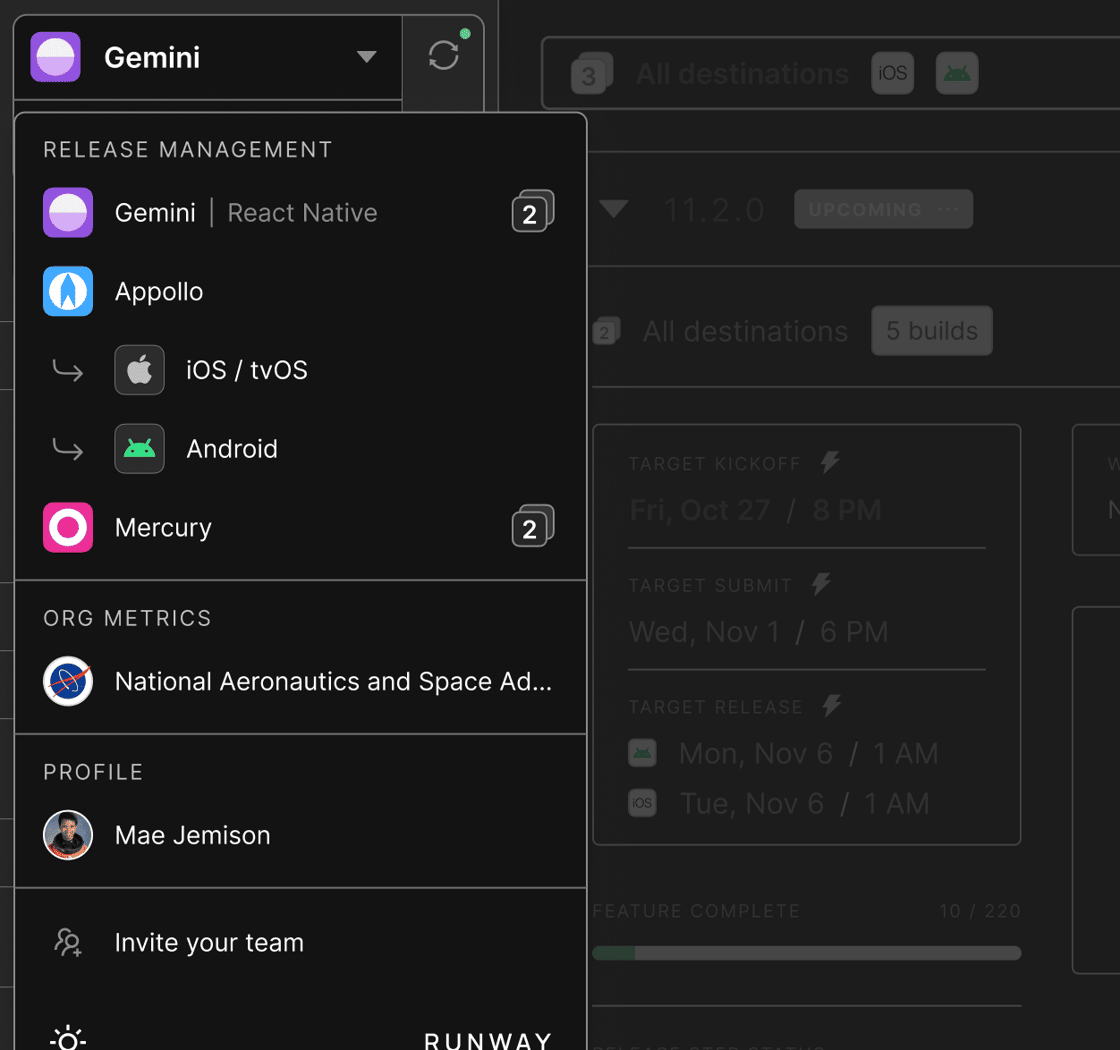
We reworked Runway’s main sidebar to make navigation around the platform faster and more intuitive, especially for organizations with many apps and for stakeholders who need to manage releases across multiple platforms. Now, you should be able to navigate between any apps in your org and any releases within those apps in just one or two clicks. The new navigation also makes it easier to jump up a level and access key areas like Org overview and Org settings.
Share public install links in build notifications with configurable expiration
To make it easier for folks who aren’t Runway users to get their hands on certain test builds, you can now optionally add public install links to the notifications that are sent when new internally distributed builds become available. To keep things secure, you have the new option of adding expiries to these links, either based on number of installs, time elapsed, or both.
New Feature Readiness filter to view changes in specific builds
Runway’s Feature Readiness view is your single source of truth when it comes to the work your team is shipping with each release, pulling together code changes, project management tickets, build info and more. But teams often want this kind of complete picture not just for the full release diff, but also to visualize changes from build to build over the course of a given release cycle. The new “Item is new in RC build” filter now lets you do just that, surfacing only those changes which were new in any specific build you select.
Expanding our MCP server and public API with new tools and endpoints
We’ve shipped a number of new tools for Runway’s MCP server, as well as new endpoints for our public API. On the MCP side, you and your favorite agent can take additional actions like setting and updating the selected app store build for any release, query adoption rates by version, and pull any and all health monitoring metrics found within a release’s Rollout view or across multiple releases via Org overview. On the Runway API side, we’ve added endpoints that allow you to create regression testing items as well as update their status and add comments (useful for integrating with external automated testing tools). There are also new endpoints for pushing user roles and groups to Runway (helpful for teams using AWS IAM or other identity providers that aren’t compatible with Directory Sync) and for uploading app icons when provisioning new apps via Runway’s config-as-code. To help you stay on top of rate limits and usage across your team, we now show consumption per API key in Org settings.
Set notification channels per checklist item
Previously, notifications related to checklist, regression testing, and approval items (e.g. for status updates and commenting) were all directed to a single channel configured in app-level notification settings. You can now configure a specific channel override in each individual item’s settings, and all comms related to that item will go to the selected channel. This is particularly useful for routing reminders and updates to the right stakeholders — e.g. marketing sign-offs to #marketing, leadership review to #mobile-leadership, specific testing gates to the right QA group, etc.
More flexibility in AI-generated release notes with customizable prompts
There are a few places in Runway where you can leverage AI to auto-generate a release summary or release notes based on the changes (both code and project management tickets) shipping with the release. Our built-in prompts are tuned for this purpose, and we offer a couple of different defaults (e.g. targeting internal versus external audiences). But to give teams even more control over the end result, we introduced the option to add additional text to the prompts that are used, so you can adjust content and tone as needed.
Require multiple approvers on fix requests
For teams with stricter sign-off requirements on fix requests — e.g. if you need both a tech lead and a product owner to OK late changes before they’re pulled into a release — you can now configure multiple approvers per fix in your fix request settings. In the Feature Readiness step fixes will surface at-a-glance progress towards approval completion, and for notifications you can choose whether to be notified for each approval (or rejection) that comes in or only when the overall approval status changes. Either way, every individual approval action is captured as a timeline event so you have a full audit trail.
Tag user groups in Microsoft Teams notifications
For teams leveraging our Microsoft Teams integration for notifications, you can now @mention user groups via tags. Based on a mapping you define between your user groups in Runway and tags in Teams, Runway will expand any group mentions you add to notifications (which can be configured per notification type and on things like checklist or regression items) to ping the right folks on the Teams side.
More options for managing access control with app membership inheritance from user groups
To make it easier to manage your team’s access in Runway, we added the option to have a user’s app membership inherit from the user groups they are a member of. In user groups settings, you can now map a given user group to one or more apps in your org. Any users who are members of that group will also be automatically granted membership of the corresponding apps, removing the need to configure both user groups and app membership separately for each user.
New integrations: Statsig, Rootly
Statsig joins LaunchDarkly and Optimizely as a supported feature flagging integration in Runway. Once connected, like with those other integrations, Runway will surface a focused list of relevant flags alongside each release with status, targeting rules, variations, and other context included. Runway diffs this flag data over time to capture any and all changes, then overlays that info on top of rollout metrics charts to help you spot app health issues that are caused by flag updates, not just new binaries.
We’ve also added Rootly as a supported scheduling integration. Similar to our other scheduling integrations, Runway will sync with your on-call schedules and map those to your release pilot rotations in the platform, automatically assigning pilots to releases and handling swaps or schedule changes where needed.